Dobrica Pavlinušić's Weblog / Blogtag:blog.rot13.org,2019-01-07:/12023-04-17T17:00:45ZPersonal weblog about technology, Open Source, perl, GNU etc...Movable Type 7.0.4WordPress comment spam - what to do about it and howtag:blog.rot13.org,2023://1.8072023-04-17T13:30:02Z2023-04-17T17:00:45ZDobrica Pavlinušićhttp://www.rot13.org/~dpavlin/
Let's assume that you inherited WordPress installation (or three) with tens of instances
(or hundreds in this case) which are generating spam using comments. I will try to describe
problem here and suggest solution which doesn't require clicking in WordPress but instead
using wp cli which is faster and easier especially if you
don't have administrative account on all those WordPress instances. Interested? Read on.
WordPress comment spam
If you try googling around how to prevent WordPress comment spam, you will soon arrive
at two solutions:
changing default_comment_status to closed which will apply to all new posts
changing comment_status on all existing posts to close
However, this is not full solution, since media in WordPress can also have comments
enabled, and those two steps above won't solve spam from media. There are plugins
to disable media comments, but since we have many WordPress instances I wanted to find
solution which doesn't require modifying each of them. And there is simple solution
using close_comments_for_old_posts option which will basically do same thing
after close_comments_days_old days (which by default is 14).
So, in summary, all this can easily be done using following commands in wp cli:
wp post list --post-status=publish --post_type=post --comment_status=open --format=ids \
        | xargs -d ' ' -I % wp post update % --comment_status=closed

wp option update default_comment_status closed

wp option update close_comments_for_old_posts 1
If wp cli doesn't work for you (for example if your WordPress instance is so old that wp cli
is returning errors for some plugins instead of working) you can achieve same thing using
SQL (this assumes that wp db query is working, but if it doesn't you can always connect
using mysql and login and password from wp-config.php):
cat << __SQL__ | wp db query
update wp_posts set comment_status='closed' where comment_status != 'closed' ;
update wp_options set option_value = 'closed' where option_name = 'default_comment_status' and option_value != 'closed' ;
update wp_options set option_value = 1 where option_name = 'close_comments_for_old_posts' and option_value != 1
__SQL__
This is also faster option, because all SQL SQL queries are invoked using single wp db query call (and this since
php instance startup which can time some time).
Cleaning up held or spam comments
After you disabled new spam in comments, you will be left with some amount of comments
which are marked as spam or left in held status if your WordPress admins didn't do anything
about them. To cleanup database, you can use following to delete spam or held comments:
wp comment delete $(wp comment list --status=spam --format=ids) --force

wp comment delete $(wp comment list --status=hold --format=ids) --force
Disabling contact form spam
All spam is not result of comments, some of it might come through contact form.
To disable those, you can disable comment plugin which will leave ugly markup on
page without it enabled, but spams will stop.
# see which contact plugins are active
wp plugin list | grep contact
contact-form-7  active  none    5.7.5.1
contact-form-7-multilingual     active  none    1.2.1

# disable them
wp plugin deactivate contact-form-7
]]>
freeradius testing and loggingtag:blog.rot13.org,2023://1.8062023-01-11T09:19:45Z2023-01-11T10:07:25Z If you are put in front of working radius server which you want to upgrade, but this is your first encounter with radius, following notes might be useful to get you started. Goal is to to upgrade system and test to see if everything still works after upgrade. radtest First way to test radius is radtest which comes with freeradius and enables you to verify if login/password combination results in successful auth. You have to ensure that you have 127.0.0.1 client in our case in /etc/freeradius/3.0/clients-local.conf file: client 127.0.0.1 { ipv4addr = 127.0.0.1 secret = testing123 shortname = test-localhost } Restart freeradius and test # systemctl restart freeradius # radtest username@example.com PASSword 127.0.0.1 0 testing123 Sent Access-Request Id 182 from 0.0.0.0:45618 to 127.0.0.1:1812 length 86 User-Name = "username@example.com" User-Password = "PASSword" NAS-IP-Address = 193.198.212.8 NAS-Port = 0 Message-Authenticator = 0x00 Cleartext-Password = "PASSword" Received Access-Accept Id 182 from 127.0.0.1:1812 to 127.0.0.1:45618 length 115 Connect-Info = "NONE" Configuration-Token = "djelatnik" Callback-Number = "username@example.com" Chargeable-User-Identity = 0x38343431636162353262323566356663643035613036373765343630333837383135653766376434 User-Name = "username@example.com" # tail /var/log/freeradius/radius.log Tue Dec 27 19:41:15 2022 : Info: rlm_ldap (ldap-aai): Opening additional connection (11), 1 of 31 pending slots used Tue Dec 27 19:41:15 2022 : Auth: (9) Login OK: [user@example.com] (from client test-localhost port 0) This will also test connection to LDAP in this case. radsniff -x To get dump of radius traffic on production server to stdout, use radsniff -x. This is useful, but won't get you encrypted parts of EAP. freeradius logging To see all protocol decode from freeradius, you can run it with -X flag in terminal which will run it in foreground with debug output. # freeradius -X If you have ability to run isolated freeradius for testing, this is easiest way to see all configuration parsed (and warnings!) and decoded EAP traffic. generating more verbose log file Adding -x to /etc/default/freeradius or to radius command-line will generate debug log in log file. Be mindful about disk space usage for additional logging! But to see enough debugging in logs to see which EAP type is unsupported like: dpavlin@deenes:~/radius-tools$ grep 'unsupported EAP type' /var/log/freeradius/radius.log (27) eap-aai: Peer NAK'd asking for unsupported EAP type PEAP (25), skipping... (41) eap-aai: Peer NAK'd asking for unsupported EAP type PEAP (25), skipping... (82) eap-aai: Peer NAK'd asking for unsupported EAP type PEAP (25), skipping... (129) eap-aai: Peer NAK'd asking for unsupported EAP type PEAP (25), skipping... (142) eap-aai: Peer NAK'd asking for unsupported EAP type PEAP (25), skipping... you will need to use -xx (two times x) to get enough debugging log. Again, monitor disk usage carefully. EAP radius testing using eapol_test from wpa_supplicant To test EAP we need to build eapol_test tool from wpa_supplicant. wget http://w1.fi/releases/wpa_supplicant-2.10.tar.gz cd wpa_supplicant-/wpa_supplicant $ cp defconfig .config $ vi .config CONFIG_EAPOL_TEST=y # install development libraries needed apt install libssl-dev libnl-3-dev libnl-genl-3-dev libnl-route-3-dev make eapol_test EAP/TTLS Now ne need configuration file for wpa_supplicant which tests EAP: ctrl_interface=/var/run/wpa_supplicant ap_scan=1 network={ ssid="eduroam" proto=WPA2 key_mgmt=WPA-EAP pairwise=CCMP group=CCMP eap=TTLS anonymous_identity="anonymous@example.com" phase2="auth=PAP" identity="username@example.com" password="PASSword" } Now we can test against our radius server (with optional certificate test): # ./wpa_supplicant-2.10/wpa_supplicant/eapol_test -c ffzg.conf -s testing123 and specifying your custom CA cert: # ./wpa_supplicant-2.10/wpa_supplicant/eapol_test -c ffzg.conf -s testing123 -o /etc/freeradius/3.0/certs/fRcerts/server-cert.pem This will generate a lot of output, but in radius log you should see Tue Dec 27 20:00:33 2022 : Auth: (9) Login OK: [username@example.com] (from client test-localhost port 0 cli 02-00-00-00-00-01 via TLS tunnel) Tue Dec 27 20:00:33 2022 : Auth: (9) Login OK: [username@example.com] (from client test-localhost port 0 cli 02-00-00-00-00-01) GTC This seems like a part of tibial knowledge (passed to me by another sysadmin), but to make GTC work, change of default_eap_type to gtc under ttls and add gtc section: ttls { # ... rest of config... default_eap_type = gtc # ... rest of config... } gtc { challenge = "Password: " auth_type = LDAP } and changing wpa-supplicant configuration to: CLONE dupli deenes:/home/dpavlin# cat eduroam-ttls-gtc.conf ctrl_interface=/var/run/wpa_supplicant ap_scan=1 network={ ssid="eduroam" proto=WPA2 key_mgmt=WPA-EAP pairwise=CCMP group=CCMP eap=TTLS anonymous_identity="anonymous@example.com" phase2="autheap=GTC" identity="username@example.com" password="PASSword" } PEAP To make PEAP GTC work, I needed to add: diff --git a/freeradius/3.0/mods-available/eap-aai b/freeradius/3.0/mods-available/eap-aai index 245b7eb..6b7cefb 100644 --- a/freeradius/3.0/mods-available/eap-aai +++ b/freeradius/3.0/mods-available/eap-aai @@ -73,5 +73,11 @@ eap eap-aai { auth_type = LDAP } + # XXX 2023-01-06 dpavlin - peap + peap { + tls = tls-common + default_eap_type = gtc + virtual_server = "default" + } } which then can be tested with: network={ ssid="wired" key_mgmt=IEEE8021X eap=PEAP anonymous_identity="anonymous@example.com" identity="username@example.com" password="PASSword" }...Dobrica Pavlinušićhttp://www.rot13.org/~dpavlin/
If you are put in front of working radius server which you want
to upgrade, but this is your first encounter with radius,
following notes might be useful to get you started.
Goal is to to upgrade system and test to see if everything still
works after upgrade.
radtest
First way to test radius is radtest which comes with freeradius and enables you to verify
if login/password combination results in successful auth.
You have to ensure that you have 127.0.0.1 client in our case in
/etc/freeradius/3.0/clients-local.conf file:
# systemctl restart freeradius


# radtest username@example.com PASSword 127.0.0.1 0 testing123

Sent Access-Request Id 182 from 0.0.0.0:45618 to 127.0.0.1:1812 length 86
    User-Name = "username@example.com"
    User-Password = "PASSword"
    NAS-IP-Address = 193.198.212.8
    NAS-Port = 0
    Message-Authenticator = 0x00
    Cleartext-Password = "PASSword"
Received Access-Accept Id 182 from 127.0.0.1:1812 to 127.0.0.1:45618 length 115
    Connect-Info = "NONE"
    Configuration-Token = "djelatnik"
    Callback-Number = "username@example.com"
    Chargeable-User-Identity = 0x38343431636162353262323566356663643035613036373765343630333837383135653766376434
    User-Name = "username@example.com"

# tail /var/log/freeradius/radius.log
Tue Dec 27 19:41:15 2022 : Info: rlm_ldap (ldap-aai): Opening additional connection (11), 1 of 31 pending slots used
Tue Dec 27 19:41:15 2022 : Auth: (9) Login OK: [user@example.com] (from client test-localhost port 0)
This will also test connection to LDAP in this case.
radsniff -x
To get dump of radius traffic on production server to stdout,
use radsniff -x.
This is useful, but won't get you encrypted parts of EAP.
freeradius logging
To see all protocol decode from freeradius, you can run it with -X flag
in terminal which will run it in foreground with debug output.
# freeradius -X
If you have ability to run isolated freeradius for testing, this is easiest
way to see all configuration parsed (and warnings!) and decoded EAP
traffic.
generating more verbose log file
Adding -x to /etc/default/freeradius or to radius command-line will
generate debug log in log file. Be mindful about disk space usage for
additional logging!
But to see enough debugging in logs to see which EAP type is unsupported like:
dpavlin@deenes:~/radius-tools$ grep 'unsupported EAP type' /var/log/freeradius/radius.log
(27) eap-aai: Peer NAK'd asking for unsupported EAP type PEAP (25), skipping...
(41) eap-aai: Peer NAK'd asking for unsupported EAP type PEAP (25), skipping...
(82) eap-aai: Peer NAK'd asking for unsupported EAP type PEAP (25), skipping...
(129) eap-aai: Peer NAK'd asking for unsupported EAP type PEAP (25), skipping...
(142) eap-aai: Peer NAK'd asking for unsupported EAP type PEAP (25), skipping...
you will need to use -xx (two times x) to get enough debugging log.
Again, monitor disk usage carefully.
EAP radius testing using eapol_test from wpa_supplicant
To test EAP we need to build eapol_test tool from wpa_supplicant.
wget http://w1.fi/releases/wpa_supplicant-2.10.tar.gz

cd wpa_supplicant-/wpa_supplicant
$ cp defconfig .config
$ vi .config

CONFIG_EAPOL_TEST=y

# install development libraries needed
apt install libssl-dev libnl-3-dev libnl-genl-3-dev libnl-route-3-dev

make eapol_test
EAP/TTLS
Now ne need configuration file for wpa_supplicant which tests EAP:
This will generate a lot of output, but in radius log you should see
Tue Dec 27 20:00:33 2022 : Auth: (9)   Login OK: [username@example.com] (from client test-localhost port 0 cli 02-00-00-00-00-01 via TLS tunnel)
Tue Dec 27 20:00:33 2022 : Auth: (9) Login OK: [username@example.com] (from client test-localhost port 0 cli 02-00-00-00-00-01)
GTC
This seems like a part of tibial knowledge (passed to me by another sysadmin), but to make GTC work,
change of default_eap_type to gtc under ttls and
add gtc section:
]]>
Local domains and caching bind server without Internet connectiontag:blog.rot13.org,2022://1.8052022-12-02T18:50:20Z2022-12-02T18:53:23Z What do do when you have bind as caching resolver which forwards to your DNS servers which do recursive resolving and host primary and secondary of your local domains and upstream link goes down? To my surprise, caching server can't resolve your local domains although both primary and secondary of those domains are still available on your network and can resolve your domains without problem (when queried directly). That's because caching server tries to do recursive resolving using root servers which aren't available if your upstream link is down, so even your local domains aren't available to clients using caching server. Solution is simple if you know what it is. Simply add your local zones on caching server with type forward: zone "ffzg.hr" { type forward; forwarders { 193.198.212.8; 193.198.213.8; }; }; zone "ffzg.unizg.hr" { type forward; forwarders { 193.198.212.8; 193.198.213.8; }; }; This will work, since queries for those zones are no longer recursive queries, so they don't need root servers which aren't available without upstream link....Dobrica Pavlinušićhttp://www.rot13.org/~dpavlin/
What do do when you have bind as caching resolver which forwards to your
DNS servers which do recursive resolving and host primary and secondary
of your local domains and upstream link goes down?
To my surprise, caching server can't resolve your local domains although
both primary and secondary of those domains are still available on
your network and can resolve your domains without problem (when queried
directly).
That's because caching server tries to do recursive resolving using
root servers which aren't available if your upstream link is down,
so even your local domains aren't available to clients using
caching server.
Solution is simple if you know what it is. Simply add your local
zones on caching server with type forward:
zone "ffzg.hr" {
    type forward;
    forwarders {
        193.198.212.8;
        193.198.213.8;
    };
};

zone "ffzg.unizg.hr" {
    type forward;
    forwarders {
        193.198.212.8;
        193.198.213.8;
    };
};
This will work, since queries for those zones are no longer
recursive queries, so they don't need root servers which aren't
available without upstream link.
]]>
dovecot maildir on compressed zfs pooltag:blog.rot13.org,2022://1.8042022-02-02T08:54:57Z2022-02-02T08:56:09ZDobrica Pavlinušićhttp://www.rot13.org/~dpavlin/
This is a story about our mail server which is coming close to
it's disk space capacity:
You might say that it's easy to resize disk and provide more
storage, but unfortunately it's not so easy. We are using ganeti
for our virtualization platform, and current version of ganeti
has limit of 4T for single drbd disk.
This can be solved by increasing third (vdc) disk and moving some
users to it, but this is not ideal. Another possibility is to
use dovecot's zlib plugin to compress mails. However, since
our Maildir doesn't have required S=12345 as part of filename
to describe size of mail, this solution also wasn't applicable to us.
Installing lvm would allow us to use more than one
disk to provide additional storage, but since ganeti already uses
lvm to provide virtual disks to instance this also isn't ideal.
OpenZFS comes to rescue
Another solution is to use OpenZFS to provide multiple disks
as single filesystem storage, and at the same time provide disk
compression. Let's create a pool:
zpool create -o ashift=9 mudrac /dev/vdb
zfs create mudrac/mudrac
zfs set compression=zstd-6 mudrac
zfs set atime=off mudrac
We are using ashift of 9 instead of 12 since it uses 512 bytes
blocks on storage (which is supported by our SSD storage) that
saves quite a bit of space:
root@t1:~# df | grep mudrac
Filesystem      1K-blocks       Used Available Use% Mounted on
mudrac/mudrac  3104245632 3062591616  41654016  99% /mudrac/mudrac # ashift=12
m2/mudrac      3104303872 2917941376 186362496  94% /m2/mudrac     # ashift=9
This is saving of 137Gb just by choosing smaller ashift.
Most of our e-mail are messages kept on server, but rarely accessed. Because
of that I opted to use zstd-6 (instead of default zstd-3) to compress it
as much as possible. But, to be sure it's right choice, I also tested
zstd-12 and zstd-19 and results are available below:
LEVEL
USED
COMP
H:S
zstd-6
2987971933184
60%
11:2400
zstd-12
2980591115776
59%
15:600
zstd-19
2972514841600
59%
52:600
Compression levels higher than 6 seem to need at least 6 cores to compress
data, so zstd-6 seemed like best performance/space tradeoff, especially
if we take into account additional time needed for compression to finish.
bullseye kernel for zfs and systemd-nspawn
To have zfs, we need recent kernel. Instead of upgrading whole
server to bullseye at this moment, I decided to boot bullseye
with zfs and start unmodified installation using systemd-nspawn.
This is easy using following command line:
but it's not ideal for automatic start of machine, so better solution
is to use machinectl and systemd service for this. Converting
this command-line into nspawn is non-trivial, but after reading
man systemd.nspawn configuration needed is:
Please note that we are not using WorkingDirectory (which would copy
files from /var/lib/machines/name) but instead just created symlink
to zfs filesystem in /var/lib/machines/.
To enable and start container on boot, we can use:
Predictable network device names which bullseye uses should provide stable network
device names.
This seems like clean solution, but in testing I figured out that
adding additional disks will change name of network devices. Previously
Debian used udev to provide mapping between network interface name and
device mac using /etc/udev/rules.d/70-persistent-net.rules.
Since this is no longer the case, solution is to define similar mapping
using systemd network like this:
When we do run out of disk space again, we could add new disk and
add it to zfs pool using:
root@t2:~# zpool set autoexpand=on mudrac
root@t2:~# zpool add mudrac /dev/vdc
Thanks to autoexpand=on above, this will automatically
make new space available. However, if we increase existing disk up to 4T
new space isn't visible immediately since zfs has partition table on disk,
so we need to extend device to use all space available using:
root@t2:~# zpool online -e mudrac vdb
zfs snapshots for backup
Now that we have zfs under our mail server, it's logical to
also use zfs snapshots to provide nice, low overhead incremental
backup. It's as easy as:
zfs snap mudrac/mudrac@$( date +%Y-%m-%d )
in cron.daliy and than shipping snapshots to backup machine.
I did look into existing zfs snapshot solutions, but they all
seemed a little bit too complicated for my use-case, so I wrote
zfs-snap-to-dr.pl which copies snapshots to backup site.
To keep just and two last snapshots on mail server simple shell snippet is enough:
Using shell to create and expire snapshots and simpler script to just
transfer snapshots seems to me like better and more flexible solution
than implementing it all in single perl script. In a sense, it's the
unix way of small tools which do one thing well. Only feature which
zfs-snap-to-dr.pl has aside from snapshot transfer is ability
to keep just configurable number of snapshots on destination which
enables it to keep disk usage under check (and re-users already
collected data about snapshots).
This was interesting journey. In future, we will migrate
mail server to bullseye and remove systemd-nspawn (it feels like we
are twisting it's hand using it like this). But it does work,
and is simple solution which will come handy in future.
]]>
Track your configuration using gittag:blog.rot13.org,2021://1.8022021-10-10T10:54:17Z2021-10-10T12:15:08Z I have a confession to make: etckeeper got me spoiled. I really like ability to track changes in git and have it documented in git log. However, this time I was working on already installed machine which didn't have much files in /etc for etckeeper, but I wanted to have peace of mind with configuration in git. This got me thinking: I could create git in root (/) of file-system and than track any file using it. Since this is three servers I could also use other two nodes to make a backup of configuration by pushing to them. To make this working first I need to do init git repository and create branch with same name as short version of hostname (this will allow us to push and pull with unique branch name on each machine): # cd / # git init # git checkout -b $( hostname -s ) With this done, all I have to do now is add and commit a file that I want to change (to preserve original version), make changes and commit it after change. To make first step easier, I created script which allows me to do git ac /path/to/file that will add file to git and commit original version in just one command (ac = add+commit). # cat /usr/local/bin/git-ac #!/bin/sh git add $* git commit -m $1 $* With this in place, I now have nice log of one server. Now it's time to repeat it on each machine and use git remote add host1 host1:/.git to add other hosts. Since I have some commits in branch with short hostname, it's also right moment to issue git branch -d master to remove master branch which we don't use (and will clutter out output later). We can fetch branches from other servers manually, but since we already have that information in git remote I wrote another quick script: # cat /usr/local/bin/git-f git remote | xargs -i git fetch {} With this I can issue just git f to fetch all branches on all hosts. If I want to push changes to other nodes, I can do git p which is similar script: # cat /usr/local/bin/git-p # disable push with git remote set-url --push pg-edu no_push git remote | xargs -i git push {} $( hostname -s ) There is also a note how to disable push to some remote (if you don't want to have full history there, but want to pull from it). With this in place, you will get nice log of changes in git, and since every host hast branch of all other hosts, you can even use git cherry-pick to get same change on multiple hosts. Last useful hint is to use git branch -va which will show all branches together with sha of last commit which can be used to cherry pick last commit. If you need older commits, you can always issue git log on remote branch and pick up commit that you need. Last step is to add cron job in cron.daily to commit changes daily which you forgot to commit: # cat /etc/cron.daily/cron-commit #!/bin/sh cd / git commit -m $( date +%Y-%m-%dT%H%M%S ) -a With everything documented here, you have easy to use git in which you can track changes of any file on your file-system. There is one additional note: if file that you want to track is on nfs mount, you will need to add and commit it from outside of nfs mount (specifying full path to file on nfs) because if you are inside nfs mount git will complain that there is no git repository there....Dobrica Pavlinušićhttp://www.rot13.org/~dpavlin/
I have a confession to make: etckeeper got me spoiled. I really like ability to track changes in git and have it documented in git log. However, this time I was working on already installed machine which didn't have much files in /etc for etckeeper, but I wanted to have peace of mind with configuration in git.
This got me thinking: I could create git in root (/) of file-system and than track any file using it. Since this is three servers I could also use other two nodes to make a backup of configuration by pushing to them.
To make this working first I need to do init git repository and create branch with same name as short version of hostname (this will allow us to push and pull with unique branch name on each machine):
With this done, all I have to do now is add and commit a file that I want to change (to preserve original version), make changes and commit it after change. To make first step easier, I created script which allows me to do
git ac /path/to/file that will add file to git and commit original version in just one command (ac = add+commit).
With this in place, I now have nice log of one server. Now it's time to repeat it on each machine and use git remote add host1 host1:/.git to add other hosts.
Since I have some commits in branch with short hostname, it's also right moment to issue git branch -d master to remove master branch which we don't use (and will clutter out output later).
We can fetch branches from other servers manually, but since we already have that information in git remote I wrote another quick script:
There is also a note how to disable push to some remote (if you don't want to have full history there, but want to pull from it).
With this in place, you will get nice log of changes in git, and since every host hast branch of all other hosts, you can even use git cherry-pick to get same change on multiple hosts. Last useful hint is to use git branch -va which will show all branches together with sha of last commit which can be used to cherry pick last commit. If you need older commits, you can always issue git log on remote branch and pick up commit that you need.
Last step is to add cron job in cron.daily to commit changes daily which you forgot to commit:
# cat /etc/cron.daily/cron-commit
#!/bin/sh

cd /
git commit -m $( date +%Y-%m-%dT%H%M%S ) -a
With everything documented here, you have easy to use git in which you can track changes of any file on your file-system. There is one additional note: if file that you want to track is on nfs mount, you will need to add and commit it from outside of nfs mount (specifying full path to file on nfs) because if you are inside nfs mount git will complain that there is no git repository there.
]]>
mysql database with latin1 charset and utf8 datatag:blog.rot13.org,2021://1.8012021-04-30T15:35:15Z2021-05-01T14:09:36Z I know that it's 2021, but we are still having problems with encoding in mysql (MariaDB in this cane, but problem is smilar). This time, it's application which I inherited which saves utf-8 data into database which is declared as latin1. How can you check if this is problem with your database too? MariaDB [ompdb]> show create database ompdb ; +----------+------------------------------------------------------------------+ | Database | Create Database | +----------+------------------------------------------------------------------+ | ompdb | CREATE DATABASE `ompdb` /*!40100 DEFAULT CHARACTER SET latin1 */ | +----------+------------------------------------------------------------------+ Alternative way is to invoke mysqldump ompdb and example file generated. Why is this a problem? If we try SQL query on one of tables: MariaDB [ompdb]> select * from submission_search_keyword_list where keyword_text like 'al%ir' ; +------------+--------------+ | keyword_id | keyword_text | +------------+--------------+ | 3657 | alzir | | 1427 | alžir | +------------+--------------+ You can clearly see double-encoded utf8 which should be alžir. This is because our client is connecting using utf8 charset, getting utf8 data in binary form so we see double-encoding. So we can try to conntect using latin1 with: root@omp-clone:/home/dpavlin# mysql --default-character-set=latin1 ompdb MariaDB [ompdb]> select * from submission_search_keyword_list where keyword_text like 'al%ir' ; +------------+--------------+ | keyword_id | keyword_text | +------------+--------------+ | 3657 | alzir | | 1427 | alžir | +------------+--------------+ Note that everything is still not well, because grid after our utf8 data is not aligned well. Googling around, you might find that possible solution is to add --default-character-set=latin1 to mysqldump, edit all occurrences of latin1 to utf8 (utf8mb4 is better choice) and reload database, and problem is solved, right? If we try to do that, we will get following error: ERROR 1062 (23000) at line 1055 in file: '1.sql': Duplicate entry 'alžir' for key 'submission_search_keyword_text' Why is this? MySQL uses collation setting to remove accents from data, so it treats alzir and alžir as same string. Since we have both of them in our data, this is not good enough. Also, editing database manually always makes me nervous, so we will using following to get database dump without declaration of encoding (due to --skip-opt option), but using latin1 for dumping data: mysqldump ompdb --skip-set-charset --default-character-set=latin1 --skip-opt > /tmp/1.sql Next, we need to create database with collation which preserves everything (utf8mb4_bin) using: CREATE DATABASE omp2 CHARACTER SET = 'utf8mb4' COLLATE 'utf8mb4_bin' ; Finally we should be able to reload created dump without errors: mysql omp2 One additional benefit of using --skip-opt for mysqldump is that every insert is split into individual line. So if you want to have correct collation and skip data which is invalid (which might be possible depending on where data is) you can use same mysqldump file and add -f flag when reloading dump like mysql -f omp2 which will report data that have errors, but insert everything else into database....Dobrica Pavlinušićhttp://www.rot13.org/~dpavlin/
I know that it's 2021, but we are still having problems with encoding in mysql (MariaDB in this cane, but problem is smilar). This time, it's application which I inherited which saves utf-8 data into database which is declared as latin1.
How can you check if this is problem with your database too?
MariaDB [ompdb]> show create database ompdb ;
+----------+------------------------------------------------------------------+
| Database | Create Database                                                  |
+----------+------------------------------------------------------------------+
| ompdb    | CREATE DATABASE `ompdb` /*!40100 DEFAULT CHARACTER SET latin1 */ |
+----------+------------------------------------------------------------------+
Alternative way is to invoke mysqldump ompdb and example file generated. Why is this a problem? If we try SQL query on one of tables:
MariaDB [ompdb]> select * from submission_search_keyword_list where keyword_text like 'al%ir' ;
+------------+--------------+
| keyword_id | keyword_text |
+------------+--------------+
|       3657 | alzir        |
|       1427 | alžir       |
+------------+--------------+
You can clearly see double-encoded utf8 which should be alžir. This is because our client is connecting using
utf8 charset, getting utf8 data in binary form so we see double-encoding. So we can try to conntect using latin1 with:
root@omp-clone:/home/dpavlin# mysql --default-character-set=latin1 ompdb
MariaDB [ompdb]> select * from submission_search_keyword_list where keyword_text like 'al%ir' ;
+------------+--------------+
| keyword_id | keyword_text |
+------------+--------------+
|       3657 | alzir        |
|       1427 | alžir       |
+------------+--------------+
Note that everything is still not well, because grid after our utf8 data is not aligned well.
Googling around, you might find that possible solution is to add
--default-character-set=latin1 to mysqldump, edit all occurrences of latin1 to utf8 (utf8mb4 is better choice) and reload database, and problem is solved, right?
If we try to do that, we will get following error:
ERROR 1062 (23000) at line 1055 in file: '1.sql': Duplicate entry 'alžir' for key 'submission_search_keyword_text'
Why is this? MySQL uses collation setting to remove accents from data, so it treats alzir and alžir as same string. Since we have both of them in our data, this is not good enough.
Also, editing database manually always makes me nervous, so we will using following to get database dump without declaration of encoding (due to --skip-opt option), but using latin1 for dumping data:
Next, we need to create database with collation which preserves everything (utf8mb4_bin) using:
CREATE DATABASE omp2 CHARACTER SET = 'utf8mb4' COLLATE 'utf8mb4_bin' ;
Finally we should be able to reload created dump without errors:
mysql omp2 < /tmp/1.sql
One additional benefit of using --skip-opt for mysqldump is that every insert is split into individual line. So if you want to have correct collation and skip data which is invalid (which might be possible depending on where data is) you can use same mysqldump file and add -f flag when reloading dump like mysql -f omp2 < /tmp/1.sql which will report data that have errors, but insert everything else into database.
]]>
request tracker where ldap users have multiple mail addressestag:blog.rot13.org,2021://1.8002021-04-18T08:08:41Z2021-04-18T09:17:11Zcode); } + # FIXME -- dpavlin 2021-04-16 -- check if e-mail from ldap is same as incomming one + if ( $key eq 'mail' && $value ne $params{EmailAddress}) { + $RT::Logger->debug( "LDAP mail check return not found key = $key value = $value $params{EmailAddress}"); + $found = 0; + } + undef $ldap; undef $ldap_msg; If e-mail address we found in LDAP is not the same one we did lookup on in CanonicalizeUserInfo we just ignore it. I think that nicely shows power of good logs and open source software written in scripting language which you can modify in the place for your (slightly broken) configuration....]]>Dobrica Pavlinušićhttp://www.rot13.org/~dpavlin/
We have been using request tracker for years but recently changed how many e-mail addresses we keep in LDAP mail attribute. Up until now, we stored just our local e-mail addresses there, but lately we also added external addresses that our users have.
This created a problem when users try to send e-mail from external address to our rt. To test this, I have account usertest which has dpavlin@example.com as first mail in LDAP and dpavlin@m.example.com as second one and I'm sending e-mail from dpavlin@m.example.com like this:
Result is following log which seems very verbose, but is also useful in understanding what is going wrong:
[14188] [Fri Apr 16 07:57:26 2021] [debug]: Going to create user with address 'dpavlin@m.example.com' (/usr/local/share/request-tracker4/lib/RT/Interface/Email/Auth/MailFrom.pm:100)
[14188] [Fri Apr 16 07:57:26 2021] [debug]: RT::Authen::ExternalAuth::CanonicalizeUserInfo called by RT::Authen::ExternalAuth /usr/local/share/request-tracker4/plugins/RT-Authen-ExternalAuth/lib/RT/Authen/ExternalAuth.pm 886 with: Comments: Autocreated on ticket submission, Disabled: , EmailAddress: dpavlin@m.example.com, Name: dpavlin@m.example.com, Password: , Privileged: , RealName: (/usr/local/share/request-tracker4/plugins/RT-Authen-ExternalAuth/lib/RT/Authen/ExternalAuth.pm:793)
[14188] [Fri Apr 16 07:57:26 2021] [debug]: Attempting to get user info using this external service: FFZG_LDAP (/usr/local/share/request-tracker4/plugins/RT-Authen-ExternalAuth/lib/RT/Authen/ExternalAuth.pm:801)
[14188] [Fri Apr 16 07:57:26 2021] [debug]: Attempting to use this canonicalization key: Name (/usr/local/share/request-tracker4/plugins/RT-Authen-ExternalAuth/lib/RT/Authen/ExternalAuth.pm:810)
[14188] [Fri Apr 16 07:57:26 2021] [debug]: LDAP Search === Base: dc=ffzg,dc=hr == Filter: (&(objectClass=*)(uid=dpavlin@m.example.com)) == Attrs: co,uid,postalCode,physicalDeliveryOfficeName,uid,streetAddress,telephoneNumber,hrEduPersonUniqueID,cn,l,st,mail (/usr/local/share/request-tracker4/plugins/RT-Authen-ExternalAuth/lib/RT/Authen/ExternalAuth/LDAP.pm:358)
[14188] [Fri Apr 16 07:57:26 2021] [debug]: Attempting to use this canonicalization key: EmailAddress (/usr/local/share/request-tracker4/plugins/RT-Authen-ExternalAuth/lib/RT/Authen/ExternalAuth.pm:810)
[14188] [Fri Apr 16 07:57:26 2021] [debug]: LDAP Search === Base: dc=ffzg,dc=hr == Filter: (&(objectClass=*)(mail=dpavlin@m.example.com)) == Attrs: co,uid,postalCode,physicalDeliveryOfficeName,uid,streetAddress,telephoneNumber,hrEduPersonUniqueID,cn,l,st,mail (/usr/local/share/request-tracker4/plugins/RT-Authen-ExternalAuth/lib/RT/Authen/ExternalAuth/LDAP.pm:358)
[14188] [Fri Apr 16 07:57:26 2021] [info]: RT::Authen::ExternalAuth::CanonicalizeUserInfo returning Address1: , City: Zagreb, Comments: Autocreated on ticket submission, Country: , Disabled: , EmailAddress: dpavlin@example.com, ExternalAuthId: usertest@example.com, Gecos: usertest, Name: usertest, Organization: , Password: , Privileged: , RealName: TestiÄiÄ ProbiÅ¡iÄ Äž, State: , WorkPhone: 014092209, Zip: (/usr/local/share/request-tracker4/plugins/RT-Authen-ExternalAuth/lib/RT/Authen/ExternalAuth.pm:869)
[14188] [Fri Apr 16 07:57:26 2021] [crit]: User could not be created: User creation failed in mailgateway: Name in use (/usr/local/share/request-tracker4/lib/RT/Interface/Email.pm:243)
[14188] [Fri Apr 16 07:57:26 2021] [warning]: Couldn't load user 'dpavlin@m.example.com'.giving up (/usr/local/share/request-tracker4/lib/RT/Interface/Email.pm:876)
[14188] [Fri Apr 16 07:57:26 2021] [crit]: User could not be loaded: User 'dpavlin@m.example.com' could not be loaded in the mail gateway (/usr/local/share/request-tracker4/lib/RT/Interface/Email.pm:243)
[14188] [Fri Apr 16 07:57:26 2021] [error]: Could not load a valid user: RT could not load a valid user, and RT's configuration does not allow
for the creation of a new user for this email (dpavlin@m.example.com).
You might need to grant 'Everyone' the right 'CreateTicket' for the
queue SysAdmin. (/usr/local/share/request-tracker4/lib/RT/Interface/Email.pm:243)
I'm aware that lines are long, and full of data but they describe problem quite well:
RT tries to find user with e-mail address dpavlin@m.example.com (which doesn't exist since RT uses just first e-mail from LDAP which is dpavlin@example.com)
then it tries to create new user with dpavlin@m.example.com, but runs another search over ldap to make sure it won't create duplicate user
this will find user in ldap due to second email adress and gives wrong error message.
As log file is very detailed and include path to files used and line numbers solution was simple additional check for this exact case:
--- /usr/share/request-tracker4/plugins/RT-Authen-ExternalAuth/lib/RT/Authen/ExternalAuth/LDAP.pm.orig  2017-04-05 14:57:22.932000146 +0200
+++ /usr/share/request-tracker4/plugins/RT-Authen-ExternalAuth/lib/RT/Authen/ExternalAuth/LDAP.pm       2021-04-16 15:49:34.800001819 +0200
@@ -429,6 +429,12 @@
                                 $ldap_msg->code);
     }

+    # FIXME -- dpavlin 2021-04-16 -- check if e-mail from ldap is same as incomming one
+    if ( $key eq 'mail' && $value ne $params{EmailAddress}) {
+       $RT::Logger->debug( "LDAP mail check return not found key = $key value = $value $params{EmailAddress}");
+       $found = 0;
+    }
+
     undef $ldap;
     undef $ldap_msg;
If e-mail address we found in LDAP is not the same one we did lookup on in CanonicalizeUserInfo we just ignore it.
I think that nicely shows power of good logs and open source software written in scripting language which you can modify in the place for your (slightly broken) configuration.
]]>
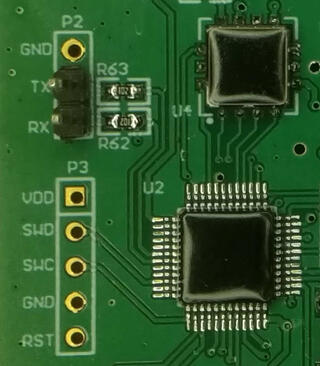
openocd, raspberry pi and unknown stm32tag:blog.rot13.org,2021://1.7992021-04-05T13:15:01Z2021-04-05T14:13:26Z If you ever needed to connect to JTAG or SWD on stm32 and tried to search for solutions on Internet, you quickly realized that amount of information is overwhelming. However, fear not. If you have Raspberry Pi and few wires, you are already half-way there. For me, this whole adventure started when I got non-working sensor which had swd header and blob over chip. This was not my first swd experiment. Thanks to great Hackaday Remoticon 2020 The Hackers Guide to Hardware Debugging by Matthew Alt I had already tried to connect using swd from Raspberry Pi to bluepill (which is stm32f103) so I had some experience with that. Now I also had unknown device so I can try what I can do with it. For a start, you can notice that device have UART TX and RX pins already soldered, so first step was to connect normal 3.3V serial to those pins and see if we have some output. And I did. I could see that it's contacting sensor chip and trying to initiate NBIoT connection, but fails. So next step was to solder SWD pins, and connect them to Raspberry Pi. For that, I created openocd configuration rpi4-zc-swd.cfg and uncommeted bottom of configuration to get first idea what chip is on the board (since it's covered with blob): swd newdap chip cpu -enable dap create chip.dap -chain-position chip.cpu target create chip.cpu cortex_m -dap chip.dap init dap info I did made some assumptions where, for example that chip is cortex_m, but since it has swd header, there was a good chance it was. However, since this sensor tries to get measurements in some configurable interval, just connecting using openocd didn't work since sensor after power up and sensor check went into sleep. While I could re-plug sensor repeatably, this is not needed since there is also rst pin (connected to pin 22 on Raspberry pi) which we can toggle from shell using: raspi-gpio set 22 op raspi-gpio get 22 raspi-gpio set 22 dl raspi-gpio get 22 raspi-gpio set 22 dh raspi-gpio get 22 This woke up sensor again, and I was able to connect to it using openocd and was greeted with following output: root@rpi4:/home/pi/openocd-rpi2-stm32# openocd -f rpi4-zc-swd.cfg Open On-Chip Debugger 0.11.0+dev-00062-g6405d35f3-dirty (2021-03-27-16:05) Licensed under GNU GPL v2 For bug reports, read http://openocd.org/doc/doxygen/bugs.html Info : BCM2835 GPIO JTAG/SWD bitbang driver Info : clock speed 100 kHz Info : SWD DPIDR 0x0bc11477 Info : chip.cpu: hardware has 4 breakpoints, 2 watchpoints Info : starting gdb server for chip.cpu on 3333 Info : Listening on port 3333 for gdb connections AP ID register 0x04770031 Type is MEM-AP AHB3 MEM-AP BASE 0xf0000003 Valid ROM table present Component base address 0xf0000000 Peripheral ID 0x00000a0447 Designer is 0x0a0, STMicroelectronics Part is 0x447, Unrecognized Component class is 0x1, ROM table MEMTYPE system memory present on bus So, indeed this was STMicroelectronics chip, but unknown model. However, using Info : SWD DPIDR 0x0bc11477 and googling that I figured out that it's probably STM32L0xx which again made sense. So I started openocd -f rpi4-zc-swd.cfg -f target/stm32l0_dual_bank.cfg and telnet 4444 to connect to it and I was able to dump flash. However, I had to be quick since sensor will power off itself after 30 seconds or so. Solution was easy, I toggled again rst pin and connected using gdb which stopped cpu and left sensor powered on. However, all was not good since quick view into 64K dump showed that at end of it there was partial AT command, so dump was not whole. So I opened STM32L0x1 page and since mcu was LQFP 48 with 128k my mcu was STM32L081CB. So I restarted openocd -f rpi4-zc-swd.cfg -f target/stm32l0_dual_bank.cfg and got two flash banks: > flash banks #0 : stm32l0.flash (stm32lx) at 0x08000000, size 0x00010000, buswidth 0, chipwidth 0 #1 : stm32l0.flash1 (stm32lx) at 0x08010000, size 0x00010000, buswidth 0, chipwidth 0 So I was able to dump them both and got full firmware. It was also very useful, because at one point I did write flash in gdb instead in telnet 4444 connection and erased one of sensors which I was able to recover using dump which I obtained. This however, produced another question for me: since flash is same on all sensors, where are setting which can be configured in sensor (and wasn't changed by re-flashing firmware). Since chip also has 6k of eeprom this was logical place to put it. However, openocd doesn't have bult-in support to dump eeprom from those chips. However, I did found post Flashing STM32L15X EEPROM with STLink under Linux which modified openocd to support reading and writing of eeprom back in 2015 but is not part of upstream openocd. I didn't want to return to openocd from 2015 or port changes to current version, but I didn't have to. Since I was only interested in dumping eeprom I was able to dump it using normal mdw command: > mdw 0x08080000 1536 1536 is number of 32-bit words in 6k eeprom (1536 * 4 = 6144). And indeed setting which are configurable where stored in eeprom. This was fun journey into openocd and stm32, so I hope this will help someone to get started. All configuration files are available at https://github.com/dpavlin/openocd-rpi2-stm32....Dobrica Pavlinušićhttp://www.rot13.org/~dpavlin/
If you ever needed to connect to JTAG or SWD on stm32 and tried to search for solutions on Internet, you quickly realized that amount of information is overwhelming. However, fear not. If you have Raspberry Pi and few wires, you are already half-way there.
For me, this whole adventure started when I got non-working sensor which had swd header and blob over chip. This was not my first swd experiment. Thanks to great Hackaday Remoticon 2020 The Hackers Guide to Hardware Debugging by Matthew Alt I had already tried to connect using swd from Raspberry Pi to bluepill (which is stm32f103) so I had some experience with that. Now I also had unknown device so I can try what I can do with it.
For a start, you can notice that device have UART TX and RX pins already soldered, so first step was to connect normal 3.3V serial to those pins and see if we have some output. And I did. I could see that it's contacting sensor chip and trying to initiate NBIoT connection, but fails. So next step was to solder SWD pins, and connect them to Raspberry Pi. For that, I created openocd configuration rpi4-zc-swd.cfg and uncommeted bottom of configuration to get first idea what chip is on the board (since it's covered with blob):
swd newdap chip cpu -enable
dap create chip.dap -chain-position chip.cpu
target create chip.cpu cortex_m -dap chip.dap
init
dap info
I did made some assumptions where, for example that chip is cortex_m, but since it has swd header, there was a good chance it was.
However, since this sensor tries to get measurements in some configurable interval, just connecting using openocd didn't work since sensor after power up and sensor check went into sleep. While I could re-plug sensor repeatably, this is not needed since there is also rst pin (connected to pin 22 on Raspberry pi) which we can toggle from shell using:
raspi-gpio set 22 op
raspi-gpio get 22
raspi-gpio set 22 dl
raspi-gpio get 22
raspi-gpio set 22 dh
raspi-gpio get 22
This woke up sensor again, and I was able to connect to it using openocd and was greeted with following output:
root@rpi4:/home/pi/openocd-rpi2-stm32# openocd -f rpi4-zc-swd.cfg
Open On-Chip Debugger 0.11.0+dev-00062-g6405d35f3-dirty (2021-03-27-16:05)
Licensed under GNU GPL v2
For bug reports, read
        http://openocd.org/doc/doxygen/bugs.html
Info : BCM2835 GPIO JTAG/SWD bitbang driver
Info : clock speed 100 kHz
Info : SWD DPIDR 0x0bc11477
Info : chip.cpu: hardware has 4 breakpoints, 2 watchpoints
Info : starting gdb server for chip.cpu on 3333
Info : Listening on port 3333 for gdb connections
AP ID register 0x04770031
        Type is MEM-AP AHB3
MEM-AP BASE 0xf0000003
        Valid ROM table present
                Component base address 0xf0000000
                Peripheral ID 0x00000a0447
                Designer is 0x0a0, STMicroelectronics
                Part is 0x447, Unrecognized
                Component class is 0x1, ROM table
                MEMTYPE system memory present on bus
So, indeed this was STMicroelectronics chip, but unknown model. However, using Info : SWD DPIDR 0x0bc11477 and googling that I figured out that it's probably STM32L0xx which again made sense.
So I started openocd -f rpi4-zc-swd.cfg -f target/stm32l0_dual_bank.cfg and telnet 4444 to connect to it and I was able to dump flash. However, I had to be quick since sensor will power off itself after 30 seconds or so. Solution was easy, I toggled again rst pin and connected using gdb which stopped cpu and left sensor powered on.
However, all was not good since quick view into 64K dump showed that at end of it there was partial AT command, so dump was not whole. So I opened STM32L0x1 page and since mcu was LQFP 48 with 128k my mcu was STM32L081CB.
So I restarted openocd -f rpi4-zc-swd.cfg -f target/stm32l0_dual_bank.cfg and got two flash banks:
So I was able to dump them both and got full firmware. It was also very useful, because at one point I did write flash in gdb instead in telnet 4444 connection and erased one of sensors which I was able to recover using dump which I obtained.
This however, produced another question for me: since flash is same on all sensors, where are setting which can be configured in sensor (and wasn't changed by re-flashing firmware). Since chip also has 6k of eeprom this was logical place to put it. However, openocd doesn't have bult-in support to dump eeprom from those chips. However, I did found post Flashing STM32L15X EEPROM with STLink under Linux which modified openocd to support reading and writing of eeprom back in 2015 but is not part of upstream openocd.
I didn't want to return to openocd from 2015 or port changes to current version, but I didn't have to. Since I was only interested in dumping eeprom I was able to dump it using normal mdw command:
> mdw 0x08080000 1536
1536 is number of 32-bit words in 6k eeprom (1536 * 4 = 6144). And indeed setting which are configurable where stored in eeprom.
This was fun journey into openocd and stm32, so I hope this will help someone to get started. All configuration files are available at https://github.com/dpavlin/openocd-rpi2-stm32.
]]>
Grove Beginner Kit sensors show graphs using InfluxDB and Grafanatag:blog.rot13.org,2020://1.7982020-12-12T14:54:13Z2020-12-12T15:01:08Z Several months ago, I got Grove Beginner Kit For Arduino for review. I wanted to see if this board would be good fit for my friends which aren't into electronics to get them started with it. So, I started with general idea: collect values from sensors, send them to InfluxDB and create graphs using Grafana. In my opinion, showing graphs of values from real world is good way to get started with something which is not possible without little bit of additional hardware, and might be good first project for people who didn't get to try Arduino platform until now. Kit is somewhat special: out of the box, it comes as single board with all sensors already attached, so to start using it, you just need to connect it to any usb port (it even comes with usb cable for that purpose). It also has plastic stand-offs which will provide isolation of bottom side from surface on which it's placed. It provides following sensors on board: ModulesInterfacePins/Address LED Digital D4 Buzzer Digital D5 OLEDDisplay 0.96" I2C I2C, 0x78(default) ButtonDigital D6 Rotary Potentiometer Analog A0 LightAnalog A6 SoundAnalog A2 Temperature & Humidity SensorDigital D3 Air Pressure Sensor I2C I2C, 0x77(default) / 0x76(optional) 3-Axis Accelerator I2C I2C, 0x19(default) So I decided to show temperature, humidity, pressure, light and sound. I also added ability to show measurements on built-in oled display if you press button. Why the button press? In my experience, oled displays are prone to burn-in, and since main usage of this sensor board will be sending data to the cloud, it would be wasteful to destroy oled display which won't be used most of the time. Programming Arduino sketch was easy using Groove Kit wiki pages which nicely document everything you will need to get you started. However, I noticed that wiki suggest to use Arduino libraries which have Grove in it's name, so I was wondering why is that so. Turns out that DHT11 temperature and humidity sensor and BMP280 temperature and pressure sensor use older version of Adafruit libraries which aren't compatible with latest versions on github. So, I tested latest versions from Adafruit and they work without any problems, just like Grove version. If you are already have them installed, there is no need to install additional Grove versions. If you deploy sensor like this (probably connected to small Linux single board computer) it would be useful if it would be possible to update software on it witout need to run full Arduino IDE (and keyboard and mouse), so I decided to write a Makefile which uses and installs arduino-cli which is go re-implementation of support which is available in Arduino IDE, but written in go that enables usage from command-line (over ssh for example). So if you are interested in trying this out, and want to get graphs similar to one above, go to GroveSensor github repository clone it to your Raspberry Pi, issue make to build it and make upload to send it to your board. You will also need to edit influx.sh to point it to your InfluxDB instance, and you can start creating graphs in Grafana. All this will also work on other platforms (like x86, amd64 or aarm64) thanks to arduino-cli install script....Dobrica Pavlinušićhttp://www.rot13.org/~dpavlin/
Several months ago, I got
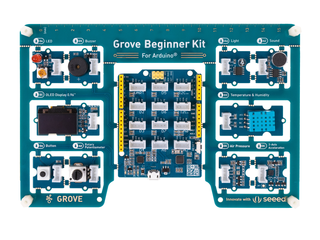
Grove Beginner Kit For Arduino for review. I wanted to see if this board would
be good fit for my friends which aren't into electronics to get them started with it.
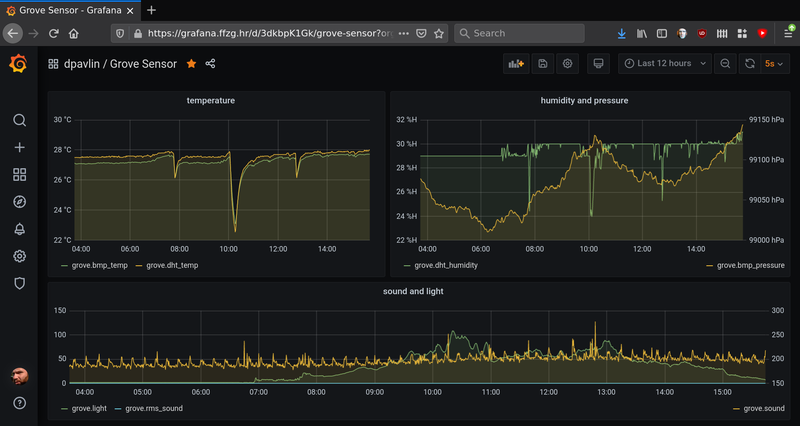
So, I started with general idea: collect values from sensors, send them to InfluxDB
and create graphs using Grafana. In my opinion, showing graphs of values from real
world is good way to get started with something which is not possible without
little bit of additional hardware, and might be good first project for people
who didn't get to try Arduino platform until now.
Kit is somewhat special: out of the box, it comes as single board with all sensors
already attached, so to start using it, you just need to connect it to any usb
port (it even comes with usb cable for that purpose). It also has plastic stand-offs
which will provide isolation of bottom side from surface on which it's placed.
It provides following sensors on board:
Modules
Interface
Pins/Address
LED
Digital
D4
Buzzer
Digital
D5
OLEDDisplay 0.96"
I2C
I2C, 0x78(default)
Button
Digital
D6
Rotary Potentiometer
Analog
A0
Light
Analog
A6
Sound
Analog
A2
Temperature & Humidity Sensor
Digital
D3
Air Pressure Sensor
I2C
I2C, 0x77(default) / 0x76(optional)
3-Axis Accelerator
I2C
I2C, 0x19(default)
So I decided to show temperature, humidity, pressure, light and sound. I also added
ability to show measurements on built-in oled display if you press button. Why the button
press? In my experience, oled displays are prone to burn-in, and since main usage of this
sensor board will be sending data to the cloud, it would be wasteful to destroy oled display
which won't be used most of the time.
Programming Arduino sketch was easy using
Groove Kit wiki pages
which nicely document everything you will need to get you started. However, I noticed that
wiki suggest to use Arduino libraries which have Grove in it's name, so I was wondering why
is that so. Turns out that DHT11 temperature and humidity sensor and BMP280 temperature and
pressure sensor use older version of Adafruit libraries which aren't compatible with latest
versions on github. So, I tested latest versions from Adafruit and they work without any problems,
just like Grove version. If you are already have them installed, there is no need to install
additional Grove versions.
If you deploy sensor like this (probably connected to small Linux single board computer) it would
be useful if it would be possible to update software on it witout need to run full Arduino IDE
(and keyboard and mouse), so I decided to write a Makefile which uses and installs
arduino-cli
which is go re-implementation of support which is available in
Arduino IDE, but written in go that enables usage from command-line (over ssh for example).
So if you are interested in trying this out, and want to get graphs similar to one above,
go to GroveSensor github repository
clone it to your Raspberry Pi, issue make to build it and make upload to
send it to your board. You will also need to edit influx.sh to point it to your
InfluxDB instance, and you can start creating graphs in Grafana. All this will also work
on other platforms (like x86, amd64 or aarm64) thanks to arduino-cli install script.
]]>
ipmi serial console using grub and systemdtag:blog.rot13.org,2020://1.7972020-04-20T10:03:52Z2022-04-24T16:08:21ZDobrica Pavlinušićhttp://www.rot13.org/~dpavlin/
I must admit that Linux administration is getting better with years. I was configuring IPMI serial console on old machines (but with recent Debian) so I decided to find out which is optimal way to configure serial console using systemd.
First, let's inspect ipmi and check it's configuration to figure out baud-rate for serial port:
root@lib10:~# ipmitool sol info 1
Info: SOL parameter 'Payload Channel (7)' not supported - defaulting to 0x01
Set in progress                 : set-complete
Enabled                         : true
Force Encryption                : true
Force Authentication            : false
Privilege Level                 : ADMINISTRATOR
Character Accumulate Level (ms) : 50
Character Send Threshold        : 220
Retry Count                     : 7
Retry Interval (ms)             : 1000
Volatile Bit Rate (kbps)        : 57.6
Non-Volatile Bit Rate (kbps)    : 57.6
Payload Channel                 : 1 (0x01)
Payload Port                    : 623
Notice that there is 1 after info. This is serial port which is sol console. If you run ipmitool without this parameter or
with zero, you will get error:
root@alfa:~# ipmitool sol info 0
Error requesting SOL parameter 'Set In Progress (0)': Invalid data field in request
Don't panic! There is ipmi sol console, but on ttyS1!
To configure serial console for Linux kernel we need to add something like console=ttyS1,57600 to kernel command-line in grub, and configuring correct serial port and speed:
All required changes to default configuration are below:
root@lib10:/etc# git diff
diff --git a/default/grub b/default/grub
index b8a096d..2b855fb 100644
--- a/default/grub
+++ b/default/grub
@@ -6,7 +6,8 @@
 GRUB_DEFAULT=0
 GRUB_TIMEOUT=5
 GRUB_DISTRIBUTOR=`lsb_release -i -s 2< /dev/null || echo Debian`
-GRUB_CMDLINE_LINUX_DEFAULT="boot=zfs rpool=lib10 bootfs=lib10/ROOT/debian-1"
+# serial console speed from ipmitool sol info 1
+GRUB_CMDLINE_LINUX_DEFAULT="console=ttyS1,57600 root=ZFS=lib10/ROOT/debian-1"
 GRUB_CMDLINE_LINUX=""

 # Uncomment to enable BadRAM filtering, modify to suit your needs
@@ -16,6 +17,8 @@ GRUB_CMDLINE_LINUX=""

 # Uncomment to disable graphical terminal (grub-pc only)
 #GRUB_TERMINAL=console
+GRUB_TERMINAL=serial
+GRUB_SERIAL_COMMAND="serial --speed=57600 --unit=1 --word=8 --parity=no --stop=1"

 # The resolution used on graphical terminal
 # note that you can use only modes which your graphic card supports via VBE
So in the end, there is noting to configure on systemd side. If you want to know why, read man 8 systemd-getty-generator
]]>
Playing video on WS2812 paneltag:blog.rot13.org,2020://1.7962020-03-08T08:31:26Z2020-03-08T17:38:41Z It all started more than a week ago when I was given 10x10 panel of ws2812 leds designed to be broken apart into individual boards. I might have said at that moment: "It is a panel, it's just missing a few wires", and so this story begins... It took me the whole day to add those few wires and turn it into panel. I started testing it using Arduino Nano with wrong FastLED example (which supports just 4 ws8212) and wondered why I'm not getting the whole panel to light up. After some sleep, I tried Adafruit example, fixed one broken data out-in wire in middle of panel and I got this: So, playing video on this panel should be easy now, right? First, I had to make a choice of platform to drive the panel. While my 10x10 panel with 100 leds needed just 300 bytes for single frame, I didn't want to have a video sending device wired to it. So, esp8266 was logical choice to provide network connectivity to the panel without usb connection (which we still need, but just for power). At first, I took the Lolin Node MCU clone, which doesn't have 5V broken out (why?), and its VIN pin has a diode between USB 5V pin and VIN, and diode voltage drop is enough to make ws2812 dark all the time. Switching to Weemos D1 mini did help there, but what to run on it? I found some examples that where too clever for me (for 8x8 panel, they use jpeg and just decode single 8x8 block to show it which won't work for my 10x10 panel). After a bit of googling, it seems to me that https://github.com/Aircoookie/WLED project is somewhat of Tasmota for WS2812 on ESP8266, so I decided to use it. While it's not designed to support WS2812 matrix but simple stripes, it has UDP realtime control which enables it to send 302 byte UDP packet (300 bytes of RGB data and two byte header). So I started writing scripts which are at https://github.com/dpavlin/WLED-video to first convert video to raw frames using something as simple as ff2rgb.sh: dpavlin@nuc:/nuc/esp8266/WLED-video$ cat ff2rgb.sh #!/bin/sh -xe f=$1 test ! -d $f.rgb && mkdir $f.rgb || rm -v $f.rgb/*.png ffmpeg -i $f -vf scale=10x10 $f.rgb/%03d.png ls $f.rgb/*.png | xargs -i convert {} -rotate 180 -gamma 0.3 -depth 8 {}.rgb To send frames I wrote simple send.pl script. I would have loved to be able to use bash udp support or some standard utility (like netcat or socat) to send frames, but null values in data didn't work well with shell pipes and I wasn't able to make it work. I also figured out that I have to modify gamma values for my frames so that colors are somewhat more correct (I had flame video which had blue hues on it without gamma correction). This is somewhat strange because WLED does have gamma correction for colors turned on, but it doesn't help and turning it off also doesn't help. So, gamma correction in pre-processing it is... And since I already had perl script to send UDP packets, I decided to open ffmpeg from it and make single script ff2wled.pl which sends video to panel like this: dpavlin@nuc:/nuc/esp8266/WLED-video$ ./ff2wled.pl rick.gif Was it all worth it? Honestly, no. The panel is small enough that video playback is really too much for such small resolution and it would be so much easier to buy ready-made panel with more leds. But, I did learn a few tricks with ffmpeg, and hopefully somebody else will benefit from this post....Dobrica Pavlinušićhttp://www.rot13.org/~dpavlin/
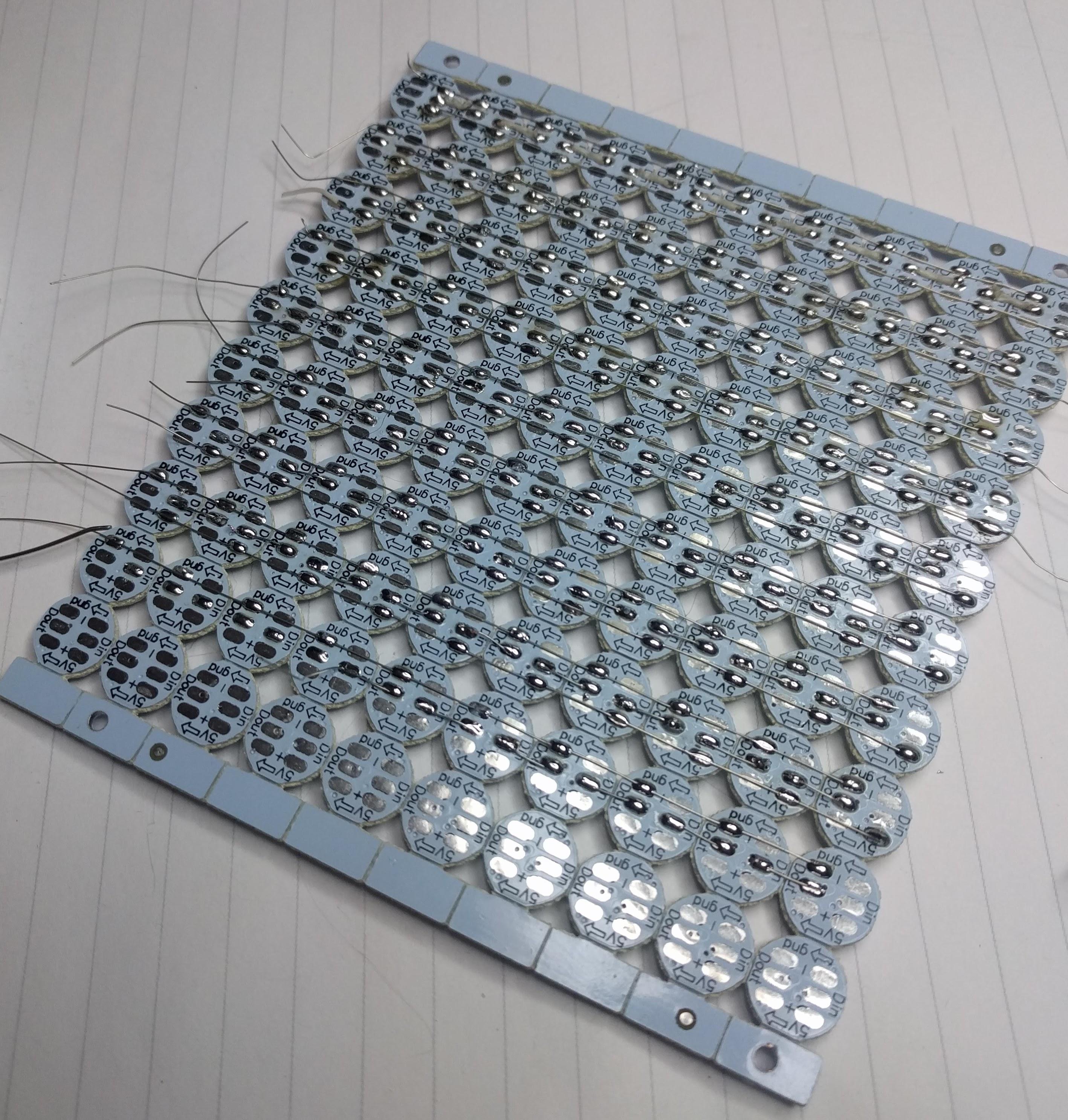
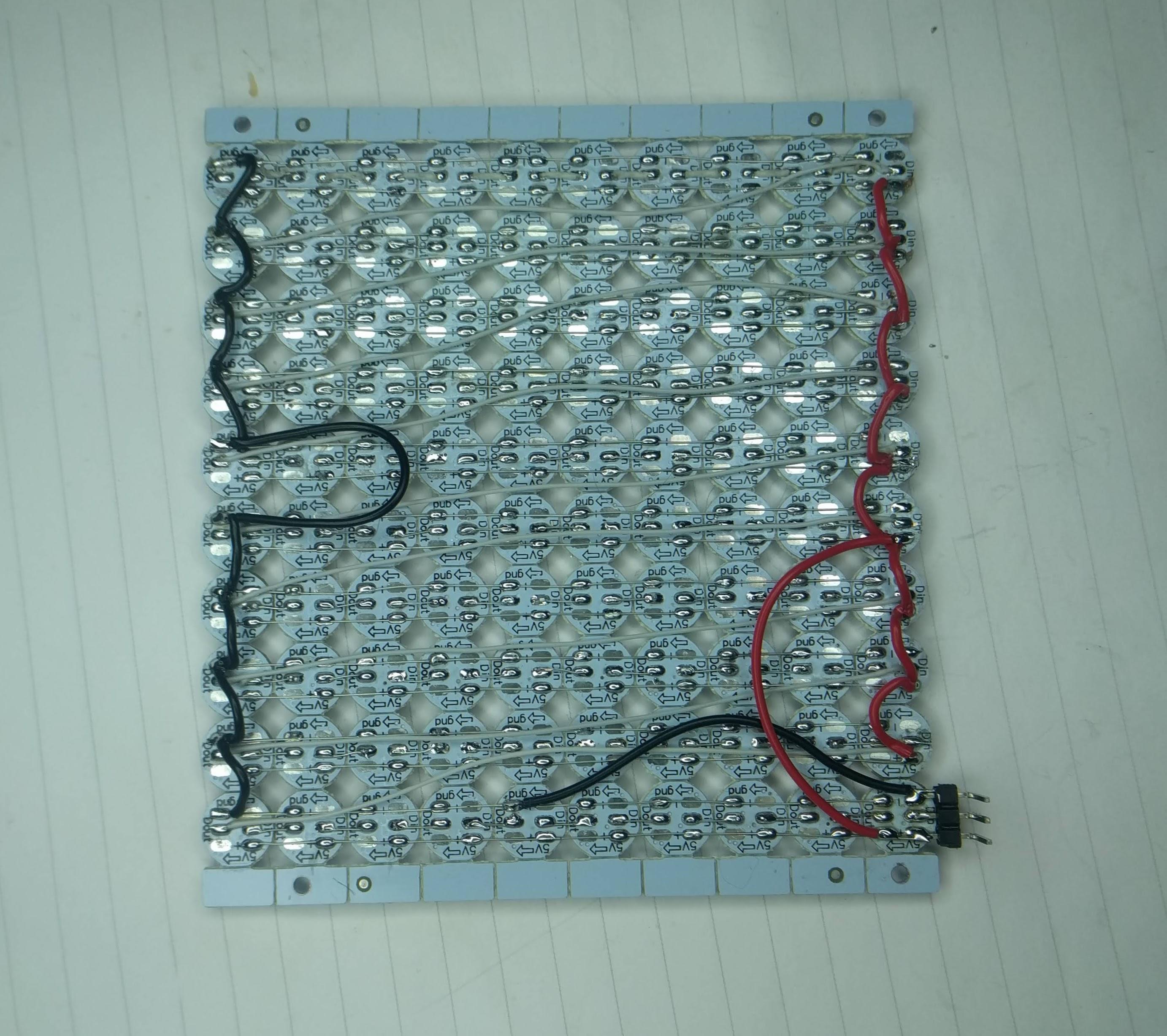
It all started more than a week ago when I was given 10x10 panel of ws2812 leds designed to be broken apart into individual boards. I might have said at that moment: "It is a panel, it's just missing a few wires", and so this story begins...
It took me the whole day to add those few wires and turn it into panel.
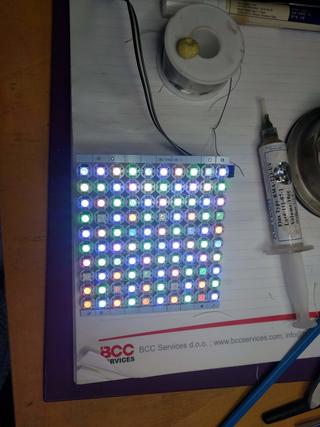
I started testing it using Arduino Nano with wrong FastLED example (which supports just 4 ws8212) and wondered why I'm not getting the whole panel to light up. After some sleep, I tried Adafruit example, fixed one broken data out-in wire in middle of panel and I got this:
So, playing video on this panel should be easy now, right?
First, I had to make a choice of platform to drive the panel. While my 10x10 panel with 100 leds needed just 300 bytes for single frame, I didn't want to have a video sending device wired to it. So, esp8266 was logical choice to provide network connectivity to the panel without usb connection (which we still need, but just for power).
At first, I took the Lolin Node MCU clone, which doesn't have 5V broken out (why?), and its VIN pin has a diode between USB 5V pin and VIN, and diode voltage drop is enough to make ws2812 dark all the time.
Switching to Weemos D1 mini did help there, but what to run on it? I found some examples that where too clever for me (for 8x8 panel, they use jpeg and just decode single 8x8 block to show it which won't work for my 10x10 panel).
After a bit of googling, it seems to me that
https://github.com/Aircoookie/WLED
project is somewhat of Tasmota for WS2812 on ESP8266, so I decided to use it. While it's not designed to support WS2812 matrix but simple stripes, it has UDP realtime control which enables it to send 302 byte UDP packet (300 bytes of RGB data and two byte header).
To send frames I wrote simple send.pl script. I would have loved to be able to use bash udp support or some standard utility (like netcat or socat) to send frames, but null values in data didn't work well with shell pipes and I wasn't able to make it work.
I also figured out that I have to modify gamma values for my frames so that colors are somewhat more correct (I had flame video which had blue hues on it without gamma correction). This is somewhat strange because WLED does have gamma correction for colors turned on, but it doesn't help and turning it off also doesn't help. So, gamma correction in pre-processing it is...
And since I already had perl script to send UDP packets, I decided to open ffmpeg
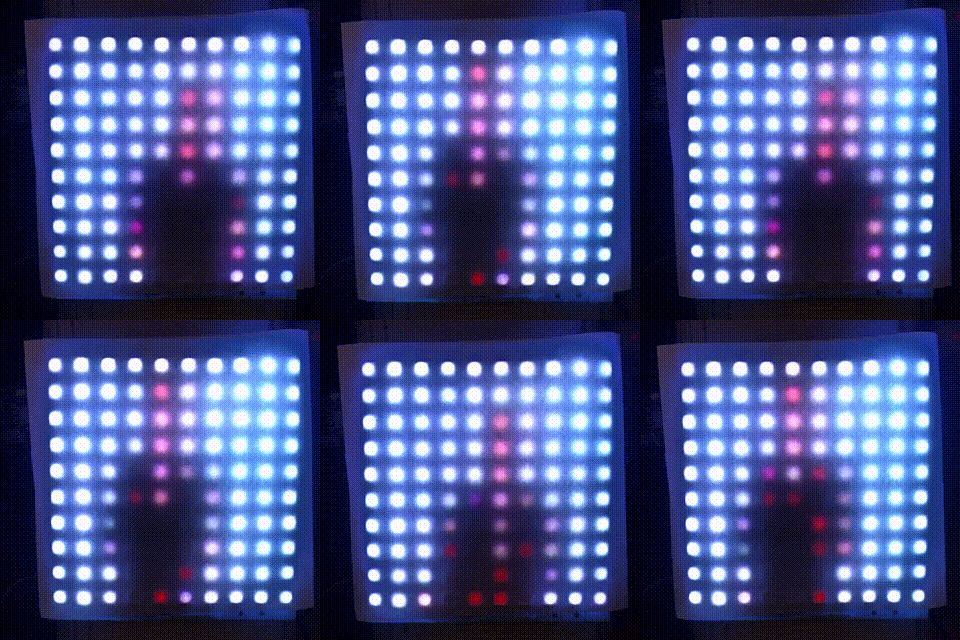
from it and make single script ff2wled.pl which sends video to panel like this:
Was it all worth it? Honestly, no. The panel is small enough that video playback is really too much for such small resolution and it would be so much easier to buy ready-made panel with more leds. But, I did learn a few tricks with ffmpeg, and hopefully somebody else will benefit from this post.
]]>
BalCCon 2k19 - So, is Android a Linux?tag:blog.rot13.org,2019://1.7952019-09-22T09:57:56Z2019-11-04T15:21:03Z Last weekend I had pleasure to attend BalCCon 2k19 and present my talk So, is Android a Linux? which is embedded below. It was great conference and I hope that my talk gave some food for though and hints how to run Linux on Android devices....Dobrica Pavlinušićhttp://www.rot13.org/~dpavlin/
Last weekend I had pleasure to attend BalCCon 2k19 and present my talk So, is Android a Linux? which is embedded below. It was great conference and I hope that my talk gave some food for though and hints how to run Linux on Android devices.
]]>
Emulate IR remote for TV or HVAC from command-line using Tasmotatag:blog.rot13.org,2019://1.7942019-08-01T07:01:43Z2019-08-17T17:04:46Z I don't have TV remote. I did get one, but as soon as I installed TV I realized that it's quite annoying to find remote to turn TV on when I sit with my wireless keyboard (computer is the only device connected to TV). So, I added keyboard shortcut using xbindkeys, addad IR led to Raspberry Pi, configured lirc and was happy about it. And then, buster with kernel 4.19 came and everything changed. Send IR to TV Upgrade to 4.19 kernel should be easy, only thing you have to do (if your IR sending diode is on pin 18) is to enable new overlay: # pwm works only on 18 dtoverlay=pwm-ir-tx,gpio_pin=18 This does not work reliably for me on Raspberry Pi 1. My TV detect roughly every third key press and this makes command-line TV remote solution useless because you can use TV menus to setup picture any more. So, I had to do something. Getting up and pressing button on TV is not something that I can live with after having this automation working for year (and TV remote was missing by now). But, I had all required components. Few weeks ago, I removed IR send/receive board from RMmini 3 and documented it's pinout: I was also in the middle of flashing Sonoff-Tasmota to bunch of Tackin plugs so it seemed like logical step to flash Tasmota to NodeMCU board, connect RMmini 3 IR board to it and give it a try. And I'm glad I did. I used to have http server (simple perl script) running on Raspberry Pi which used irsend to send IR codes. From xbindkey perspective, my configuration used curl and all I had to do to get IR working again was changing my script to use mosquitto instead of irsend: mosquitto_pub -h rpi2 -q 2 -t cmnd/ir/IRSend -m '{"protocol": "NEC","bits": 32, "data": 0x20DF10EF}' At this point I realized that I can put this into .xbindkeyrc and contact esp8266 directly. This didn't work... You can't have double quotes in commands which are executed and I had to put it into shell script and call that. And to my amazement, there was noticeable difference in response time of TV. In retrospect, this seemed obvious because my TV nuc is much faster than Raspberry Pi, but this was probably the most unexpected benefit of this upgrade. When I said that you have to connect IR receiver and sender on NodeMCU pins, you have to take care not to hit pins that have special purpose on power-up. For example, if you connect something that will pull to ground on powerup (IR led for example) to gpio0 esp8266 will stay in boot loader mode. gpio2 and gpio16 are led pins on nodemcu board, so don't use them (and define them as Led1i and Led2i in configuration). Having LEDs configured in tasmota allows me to extend my shell script and blink led after IR code has been sent: dpavlin@nuc:~$ cat tv-on.sh #!/bin/sh mosquitto_pub -h rpi2 -q 2 -t cmnd/ir/IRSend -m '{"protocol": "NEC","bits": 32, "data": 0x20DF10EF}' mosquitto_pub -h rpi2 -q 2 -t cmnd/ir/LedPower -m 1 mosquitto_pub -h rpi2 -q 2 -t cmnd/ir/LedPower -m 0 Send IR to HVAC By pure luck, just a few days latter, my friend wanted to control his ACs from computer. Again tasmota came to the rescue. Since HVAC support in tasmota will increase firmware size over 512Kb (which breaks OTA upgrade on 1Mb modules) it's not compiled in by default. However, you can edit sonoff/my_user_config.h and uncomment it: #define USE_IR_HVAC // Support for HVAC systems using IR (+3k5 code) #define USE_IR_HVAC_TOSHIBA // Support IRhvac Toshiba protocol #define USE_IR_HVAC_MITSUBISHI // Support IRhvac Mitsubischi protocol #define USE_IR_HVAC_LG // Support IRhvac LG protocol #define USE_IR_HVAC_FUJITSU // Support IRhvac Fujitsu protocol #define USE_IR_HVAC_MIDEA // Support IRhvac Midea/Komeco protocol However, if you want to keep OTA update working, you will also have to turn off some other configuration options (I don't use Domoticz or Home Assistant) to keep firmware size below 512Kb. To create IR sender, I decided to add IR LED, transistor and resistor to existing ESP-01 module with DHT11 board (which has 3.3v regulator on it) according to the following DaveCAD(tm) drawing: If you are wondering why I'm connecting IR led to RX pin (gpio3), it's because gpio0 is special, gpio2 is already used for dht11 and TX (which is gpio1) is also special. Since we don't need serial, using single pin left RX saves the day. And this is the picture of the first prototype (on which I tried all pins until I settled on RX): With all this in place and quick re-flash, we where than able to issue commands like this to control AC: mosquitto_pub -h rpi2 -t 'cmnd/ir/irhvac' -m '{ "Vendor": "Mitsubishi", "Power": 1, "Mode":"Cold", "Temp": 25}' mosquitto_pub -h rpi2 -t 'cmnd/ir/irhvac' -m '{ "Vendor": "Mitsubishi", "Power": 0}' So, with all this, I hope that you don't have any excuse not to control your IR devices from a command-line. Update: Just to make sure that you don't think this is my best soldering ever here is also picture of 4 more modules which will be distributed to my friends....Dobrica Pavlinušićhttp://www.rot13.org/~dpavlin/
I don't have TV remote. I did get one, but as soon as I installed TV I realized that it's quite annoying to find remote to turn TV on when I sit with my wireless keyboard (computer is the only device connected to TV). So, I added keyboard shortcut using xbindkeys, addad IR led to Raspberry Pi, configured lirc and was happy about it. And then, buster with kernel 4.19 came and everything changed.
Send IR to TV
Upgrade to 4.19 kernel should be easy, only thing you have to do (if your IR sending diode is on pin 18) is to enable new overlay:
# pwm works only on 18
dtoverlay=pwm-ir-tx,gpio_pin=18
This does not work reliably for me on Raspberry Pi 1. My TV detect roughly every third key press and this makes command-line TV remote solution useless because you can use TV menus to setup picture any more.
So, I had to do something. Getting up and pressing button on TV is not something that I can live with after having this automation working for year (and TV remote was missing by now). But, I had all required components.
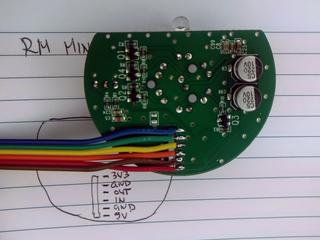
Few weeks ago, I removed IR send/receive board from RMmini 3 and documented it's pinout:
I was also in the middle of flashing Sonoff-Tasmota to bunch of Tackin plugs so it seemed like logical step to flash Tasmota to NodeMCU board, connect RMmini 3 IR board to it and give it a try. And I'm glad I did.
I used to have http server (simple perl script) running on Raspberry Pi which used irsend to send IR codes. From xbindkey perspective, my configuration used curl and all I had to do to get IR working again was changing my script to use mosquitto instead of irsend:
At this point I realized that I can put this into .xbindkeyrc and contact esp8266 directly. This didn't work... You can't have double quotes in commands which are executed and I had to put it into shell script and call that.
And to my amazement, there was noticeable difference in response time of TV. In retrospect, this seemed obvious because my TV nuc is much faster than Raspberry Pi, but this was probably the most unexpected benefit of this upgrade.
When I said that you have to connect IR receiver and sender on NodeMCU pins, you have to take care not to hit pins that have special purpose on power-up. For example, if you connect something that will pull to ground on powerup (IR led for example) to gpio0 esp8266 will stay in boot loader mode.
gpio2 and gpio16 are led pins on nodemcu board, so don't use them (and define them as Led1i and Led2i in configuration).
Having LEDs configured in tasmota allows me to extend my shell script and blink led after IR code has been sent:
By pure luck, just a few days latter, my friend wanted to control his ACs from computer. Again tasmota came to the rescue. Since HVAC support in tasmota will increase firmware size over 512Kb (which breaks OTA upgrade on 1Mb modules) it's not compiled in by default. However, you can edit sonoff/my_user_config.h and uncomment it:
    #define USE_IR_HVAC                          // Support for HVAC systems using IR (+3k5 code)
    #define USE_IR_HVAC_TOSHIBA                  // Support IRhvac Toshiba protocol
    #define USE_IR_HVAC_MITSUBISHI               // Support IRhvac Mitsubischi protocol
    #define USE_IR_HVAC_LG                       // Support IRhvac LG protocol
    #define USE_IR_HVAC_FUJITSU                  // Support IRhvac Fujitsu protocol
    #define USE_IR_HVAC_MIDEA                    // Support IRhvac Midea/Komeco protocol
However, if you want to keep OTA update working, you will also have to turn off some other configuration options (I don't use Domoticz or Home Assistant) to keep firmware size below 512Kb.
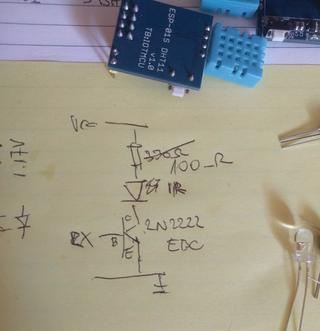
To create IR sender, I decided to add IR LED, transistor and resistor to existing ESP-01 module with DHT11 board (which has 3.3v regulator on it) according to the following DaveCAD(tm) drawing:
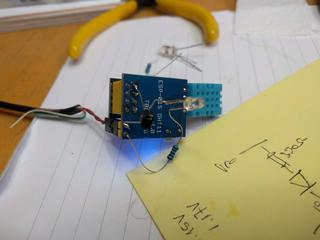
If you are wondering why I'm connecting IR led to RX pin (gpio3), it's because gpio0 is special, gpio2 is already used for dht11 and TX (which is gpio1) is also special. Since we don't need serial, using single pin left RX saves the day. And this is the picture of the first prototype (on which I tried all pins until I settled on RX):
With all this in place and quick re-flash, we where than able to issue commands like this to control AC:
So, with all this, I hope that you don't have any excuse not to control your IR devices from a command-line.
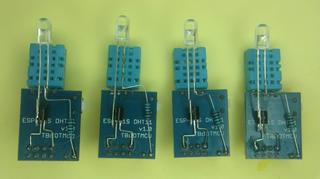
Update: Just to make sure that you don't think this is my best soldering ever here is also picture of 4 more modules which will be distributed to my friends.
]]>
DORS/CLUC 2019: Mainline kernel on ARM Tegra20 devices that are left behind on 2.6 kernelstag:blog.rot13.org,2019://1.7932019-05-13T15:11:34Z2019-05-28T09:58:07Z Is it possible to take obsolete Android device and port it to mainline kernel with Debian? (make RaspberryPi-like device)...Dobrica Pavlinušićhttp://www.rot13.org/~dpavlin/
Is it possible to take obsolete Android device and port it to mainline kernel with Debian? (make RaspberryPi-like device)
]]>
Here is transcript of presentation:
0:00:00.000,0:00:04.529
I hope that you have enjoyed the first day of DORS
0:00:01.949,0:00:08.030
CLUC. My name is Dobrica PavlinuàáiÃÂÃÂ
0:00:04.529,0:00:11.010
and today I will talk about to you about
0:00:08.030,0:00:15.480
how you can take the old Android device
0:00:11.010,0:00:18.840
and port the latest software on it. Over
0:00:15.480,0:00:23.580
there is my prop for this presentation
0:00:18.840,0:00:26.789
which tries to prove that it's really
0:00:23.580,0:00:29.609
possiblei. So the question is: is it
0:00:26.789,0:00:32.430
possible to take the old Android device,
0:00:29.609,0:00:37.020
in this case very old Android device, and
0:00:32.430,0:00:39.420
run latest Linux on it? In my case I
0:00:37.020,0:00:42.600
wanted to make something which would be
0:00:39.420,0:00:45.420
comparable to Respberry Pi which basically
0:00:42.600,0:00:49.980
for me means that I could run Debian on
0:00:45.420,0:00:56.100
it. So what is our device? Our device is
0:00:49.980,0:00:59.280
Tegra tablet from 2011 which is actually
0:00:56.100,0:01:02.280
quite a high-end tablet for that age, it
0:00:59.280,0:01:06.869
has two cores with 1 Gb RAM, it has
0:01:02.280,0:01:10.439
64 Gb of emmc storage, if you
0:01:06.869,0:01:15.140
remember in 2011 that's a huge amount of
0:01:10.439,0:01:20.189
storage, it has quite nice display and
0:01:15.140,0:01:22.740
Wi-Fi, GPS and stuff like that. The things
0:01:20.189,0:01:27.200
which were available from the
0:01:22.740,0:01:29.700
manufacturer is really old 2.6.36 kernel
0:01:27.200,0:01:33.180
fortunately available in source code
0:01:29.700,0:01:38.579
which is very helpful with quite a lot
0:01:33.180,0:01:41.490
of changes, there was also schematic
0:01:38.579,0:01:44.579
available from the OEM manufacturer
0:01:41.490,0:01:49.020
which actually produced that laptop for
0:01:44.579,0:01:51.299
Lenovo which was quite fortunate but not
0:01:49.020,0:01:54.149
as useful as you might think
0:01:51.299,0:01:56.520
so if you can't find the same schematic
0:01:54.149,0:02:01.950
for your Android tablet or device don't
0:01:56.520,0:02:05.729
don't despair it's not obligatory there
0:02:01.950,0:02:08.520
is quite good Tegra support in the
0:02:05.729,0:02:11.250
mainline kernel and as you'll see there
0:02:08.520,0:02:12.950
is also separately developed driver
0:02:11.250,0:02:16.310
which supports
0:02:12.950,0:02:19.819
both 2d and 3d acceleration as you can
0:02:16.310,0:02:22.580
see it's my prop over there, and they
0:02:19.819,0:02:24.830
were available really cheaply locally
0:02:22.580,0:02:28.849
basically I bought it at Njuàákalo
0:02:24.830,0:02:34.340
which is our local secondhand resale
0:02:28.849,0:02:37.250
kind of site. So what is the first step
0:02:34.340,0:02:39.620
if you want to do something like that? My
0:02:37.250,0:02:41.660
suggestion is to try to find the serial
0:02:39.620,0:02:44.750
port on your device. It would be really
0:02:41.660,0:02:48.500
really helpful when you try to do that
0:02:44.750,0:02:51.290
because first thing you want to do is
0:02:48.500,0:02:57.019
get some kind of feedback from your
0:02:51.290,0:03:00.049
tablet. In my case see the screen didn't
0:02:57.019,0:03:02.000
work so the serial port was really
0:03:00.049,0:03:06.440
invaluable to see whether I am actually
0:03:02.000,0:03:09.140
doing something or not. In this case I
0:03:06.440,0:03:12.950
had a schematic so I knew that there is
0:03:09.140,0:03:16.340
a four pin port somewhere on the tablet
0:03:12.950,0:03:18.680
on which is serial port, I also from the
0:03:16.340,0:03:20.420
schematic knew that this serial port is
0:03:18.680,0:03:23.329
connected directly to the Tegra
0:03:20.420,0:03:26.750
processor which in my case meant that
0:03:23.329,0:03:28.640
this serial port is 1.8 volts which
0:03:26.750,0:03:32.269
means that you don't want to connect it
0:03:28.640,0:03:36.320
to 3.3 volt device although Tegra CPUs
0:03:32.269,0:03:39.140
might be 3.3 volt tolerable but, I don't
0:03:36.320,0:03:44.150
know, you don't want to try that on your
0:03:39.140,0:03:47.239
device. But there is 1.8 volts serial
0:03:44.150,0:03:50.660
cable available from China which are
0:03:47.239,0:03:52.880
basically often often dubbed iPhone
0:03:50.660,0:03:57.430
cables because it uses the same voltage
0:03:52.880,0:03:57.430
but it's just the serial at 1.8 volts.
0:03:58.420,0:04:05.150
Why do I have the picture of the serial
0:04:01.310,0:04:08.090
port? Because in this case this was not
0:04:05.150,0:04:11.630
the only unpopulated connector of the on
0:04:08.090,0:04:14.780
the board with 4 pins, so learn from my
0:04:11.630,0:04:16.579
mistakes and don't try every possible
0:04:14.780,0:04:19.700
connector and until you find the right
0:04:16.579,0:04:21.950
one. It took me quite quite some time to
0:04:19.700,0:04:26.479
figure out that maybe it's under the
0:04:21.950,0:04:30.560
shield and it really was! The other thing
0:04:26.479,0:04:35.570
which you want to have some ability to
0:04:30.560,0:04:38.390
do and you almost always have: basically
0:04:35.570,0:04:42.229
you always have it -- is to be able to run
0:04:38.390,0:04:44.270
your own code on the device. Why do you
0:04:42.229,0:04:47.659
always have that on the Android devices?
0:04:44.270,0:04:50.479
Because when manufacturers create the
0:04:47.659,0:04:53.330
device you should be able
0:04:50.479,0:04:56.539
somehow to load the initial firmware on
0:04:53.330,0:05:00.050
it. So if we have any ARM device either
0:04:56.539,0:05:03.470
Allwinner, Rockchip, Tegra or anything,
0:05:00.050,0:05:07.190
there is a way to actually load your own
0:05:03.470,0:05:09.890
code on it, so that's not the showstopper.
0:05:07.190,0:05:12.860
Tegra is somewhat specific because there
0:05:09.890,0:05:17.320
is ability to lock Tegra bootloader
0:05:12.860,0:05:20.090
so you can't load the non-authorized
0:05:17.320,0:05:22.940
software on it, but this was not the case
0:05:20.090,0:05:25.640
in this case. In Tegra it's called APX
0:05:22.940,0:05:32.870
mode, you can enter it using two keyboard
0:05:25.640,0:05:35.599
presses and with tegrarcm from github
0:05:32.870,0:05:37.760
you can actually create the binary file
0:05:35.599,0:05:40.150
which you can send to your tablet and
0:05:37.760,0:05:43.909
make it do something.
0:05:40.150,0:05:46.219
This ability to to load
0:05:43.909,0:05:46.700
something on the device which is at that
0:05:46.219,0:05:49.430
point
0:05:46.700,0:05:51.530
unmodified enables you to actually
0:05:49.430,0:05:54.169
experiment safely because you can always
0:05:51.530,0:05:56.150
put something, try if it works, and you
0:05:54.169,0:05:59.450
didn't actually change the device itself.
0:05:56.150,0:06:01.520
Although this tablet was so unusable
0:05:59.450,0:06:02.960
because it had so old Anrdoid that
0:06:01.520,0:06:06.919
market didn't support
0:06:02.960,0:06:10.130
it so it wasn't so essential.
0:06:06.919,0:06:11.930
But you know, if this is your only device,
0:06:10.130,0:06:15.500
you probably don't want to break it in
0:06:11.930,0:06:19.070
your first experiment. But just have
0:06:15.500,0:06:20.990
in mind that you won't break your device,
0:06:19.070,0:06:24.530
it's always possible to recover it
0:06:20.990,0:06:27.409
whatever the device is. So far what we
0:06:24.530,0:06:29.479
have? We have working 2.6 kernel with all
0:06:27.409,0:06:32.240
the changes needed to actually make this
0:06:29.479,0:06:35.330
tablet work which isn't really very
0:06:32.240,0:06:36.230
useful but it's nice because we can see
0:06:35.330,0:06:39.380
what
0:06:36.230,0:06:42.440
did they change to make this tablet
0:06:39.380,0:06:45.590
work. I had a serial port and I had the
0:06:42.440,0:06:47.390
ability to run my own code. So what is
0:06:45.590,0:06:49.670
the first step? The first step is to have
0:06:47.390,0:06:52.940
some kind of bootloader which will load
0:06:49.670,0:06:57.230
our Linux kernel. On ARM devices this
0:06:52.940,0:07:00.410
is u-boot and since this tablet is
0:06:57.230,0:07:04.670
actually based on Ventana reference
0:07:00.410,0:07:06.830
design from Nvidia, which you can
0:07:04.670,0:07:11.450
actually figure out by looking at 2.6
0:07:06.830,0:07:14.090
kernel, it was really simple to try to
0:07:11.450,0:07:15.700
compile u-boot, try it out with APX
0:07:14.090,0:07:20.900
and it worked!
0:07:15.700,0:07:22.910
Few steps later I also ... got the
0:07:20.900,0:07:24.890
serial output out of the bootloader
0:07:22.910,0:07:26.840
which was the good first step, but
0:07:24.890,0:07:27.050
display was completely blank. So what did I
0:07:26.840,0:07:29.480
do?
0:07:27.050,0:07:31.910
I took the diff from the 2.6
0:07:29.480,0:07:34.880
kernel and looked what did they modify
0:07:31.910,0:07:38.330
to make the display work? I ported that
0:07:34.880,0:07:44.930
and I got even display in u-boot! mmm
0:07:38.330,0:07:49.940
Victory! I said "port changes" -- it might
0:07:44.930,0:07:52.460
seem extremely complicated or hard. but
0:07:49.940,0:07:54.260
basically that's it! On the left side you
0:07:52.460,0:07:57.200
see the changes which original
0:07:54.260,0:07:59.060
developers made for 2.6 kernel and on
0:07:57.200,0:08:00.950
the right side you can see the changes
0:07:59.060,0:08:03.770
which I made in u-boot to make it work
0:08:00.950,0:08:05.930
basically you compare the names of
0:08:03.770,0:08:12.410
the variables, you change the few ones
0:08:05.930,0:08:14.330
and it works. Once I had u-boot the
0:08:12.410,0:08:16.820
next step was actually to compile the
0:08:14.330,0:08:19.070
kernel and make it work. As I mentioned
0:08:16.820,0:08:21.710
earlier there is the grate driver
0:08:19.070,0:08:26.120
project which basically supports 2d and
0:08:21.710,0:08:28.460
3d acceleration on Tegra devices so I
0:08:26.120,0:08:33.530
actually started with it because I
0:08:28.460,0:08:36.700
wanted 2d and 3d and video decoding I
0:08:33.530,0:08:43.010
started in the same way I looked at 2.6
0:08:36.700,0:08:46.340
kernel tried to port the display, it
0:08:43.010,0:08:49.520
should be possible to define display
0:08:46.340,0:08:53.120
in device tree itself, for some reason
0:08:49.520,0:08:56.990
it did not work for me so this was few lines
0:08:53.120,0:09:00.410
of diff in kernel itself, but other
0:08:56.990,0:09:02.900
than that, all the other things were
0:09:00.410,0:09:06.260
basically device tree configuration.
0:09:02.900,0:09:09.770
I had to configure the buttons
0:09:06.260,0:09:14.510
on the laptop to generate keyboard
0:09:09.770,0:09:16.700
events and from 2.6 kernel it wasn't
0:09:14.510,0:09:19.160
clear whether the button is both pull-up
0:09:16.700,0:09:22.010
or pulldown but you try one, you try the
0:09:19.160,0:09:24.320
other, and if you make a mistake, if you
0:09:22.010,0:09:26.660
said that button is pulled down and it's
0:09:24.320,0:09:28.190
pull up the thing which will happen is
0:09:26.660,0:09:31.580
that when you press the button it
0:09:28.190,0:09:34.100
it won't release, so you will figure it
0:09:31.580,0:09:35.750
out. Basically some buttons are pull up
0:09:34.100,0:09:39.130
some buttons are pull down, you just
0:09:35.750,0:09:42.650
experiment a little and it will work out.
0:09:39.130,0:09:44.720
Then I added a few additional
0:09:42.650,0:09:47.630
modules which were supported in upstream
0:09:44.720,0:09:50.930
kernel already, like a temperature sensor
0:09:47.630,0:09:54.800
compass and there is also in tablet
0:09:50.930,0:09:56.690
accelerometer which should be
0:09:54.800,0:09:59.300
supported by the kernel module, but
0:09:56.690,0:10:03.470
currently doesn't work -- work in
0:09:59.300,0:10:06.050
progress -- but all in all this diff --stat
0:10:03.470,0:10:09.830
at the bottom of the slide are all the
0:10:06.050,0:10:13.040
changes which were required to make this
0:10:09.830,0:10:19.270
tablet, over there, which actually started
0:10:13.040,0:10:24.800
screensaver, working on the latest kernel
0:10:19.270,0:10:27.170
not really so hard at all, right? As the
0:10:24.800,0:10:29.540
next step and probably the most
0:10:27.170,0:10:32.030
important thing which I learned during
0:10:29.540,0:10:35.300
this process, is actually that you want
0:10:32.030,0:10:37.190
to develop using NFS root. You don't
0:10:35.300,0:10:40.040
actually want to experiment on the
0:10:37.190,0:10:45.020
device itself because it's so convenient
0:10:40.040,0:10:47.030
to actually edit files in VI on your NFS
0:10:45.020,0:10:50.720
server which in my case is just a
0:10:47.030,0:10:52.550
ordinary laptop instead of editing it on
0:10:50.720,0:10:54.230
the device itself especially if the
0:10:52.550,0:10:57.520
device itself doesn't have the keyboard.
0:10:54.230,0:11:00.500
Right now I do have the keyboard but
0:10:57.520,0:11:03.620
when I started I didn't have any device
0:11:00.500,0:11:06.650
and it's you know it's really much more
0:11:03.620,0:11:10.940
variable to do that on on your normal
0:11:06.650,0:11:15.950
development machine. NFS will also enable
0:11:10.940,0:11:18.140
you to to try different devices but the
0:11:15.950,0:11:21.620
prerequisite for that is actually to
0:11:18.140,0:11:23.290
have the USB Ethernet device which is
0:11:21.620,0:11:26.320
supported by u-boot
0:11:23.290,0:11:29.360
unfortunately u-boot support very few
0:11:26.320,0:11:33.250
USB Ethernet dongle so you will have to
0:11:29.360,0:11:36.529
find the one which is supported or port
0:11:33.250,0:11:39.350
changes from some other USB dongle which
0:11:36.529,0:11:42.650
is also not that hard but it wasn't
0:11:39.350,0:11:47.210
needed because I actually had a dongle
0:11:42.650,0:11:49.100
which is supported. The second
0:11:47.210,0:11:53.330
interesting thing I learned here is the
0:11:49.100,0:11:57.160
one marked here in yellow which is that
0:11:53.330,0:12:00.950
the kernel configuration
0:11:57.160,0:12:04.460
because you say to u-boot ok please
0:12:00.950,0:12:06.860
use the DHCP acquire MAC address and
0:12:04.460,0:12:09.830
then load the kernel and initramfs
0:12:06.860,0:12:13.160
from the from the server and once
0:12:09.830,0:12:16.880
you start the kernel the kernel also has
0:12:13.160,0:12:20.900
the option to acquire address over DHCP but
0:12:16.880,0:12:24.920
unfortunately that didn't work I suspect
0:12:20.900,0:12:28.520
that it's problem with initialization of
0:12:24.920,0:12:31.150
the USB interface in kernel so the
0:12:28.520,0:12:34.430
interface is not initialized correctly
0:12:31.150,0:12:37.490
or something, but you can always hard
0:12:34.430,0:12:40.880
code the IP address and that worked. If
0:12:37.490,0:12:42.709
you want more info about making u-boot
0:12:40.880,0:12:45.770
work with the NFS root and
0:12:42.709,0:12:49.010
configuration of dnsmasq the last link
0:12:45.770,0:12:52.910
here is actually the wiki page in which
0:12:49.010,0:12:55.220
you can find more information. And then I
0:12:52.910,0:12:57.200
had the tablet which was somewhat
0:12:55.220,0:13:00.860
working but the problem was that I
0:12:57.200,0:13:03.560
couldn't charge it. Since this tablet is
0:13:00.860,0:13:06.830
from 2011 you would expect that the
0:13:03.560,0:13:09.950
battery is quite dead and it really is
0:13:06.830,0:13:12.260
quite dead but it's really annoying that
0:13:09.950,0:13:13.850
you can actually work several hours on
0:13:12.260,0:13:16.130
your tablet and then you have to take
0:13:13.850,0:13:16.400
another device which was charging during
0:13:16.130,0:13:20.600
that
0:13:16.400,0:13:25.430
time so I wanted to somehow make it work
0:13:20.600,0:13:27.590
to make it work always, to have it
0:13:25.430,0:13:32.560
always powered on and to be able to charge
0:13:27.590,0:13:35.510
it from the USB. The problem is that this
0:13:32.560,0:13:38.540
particular tablet is very sensitive to
0:13:35.510,0:13:42.580
the 5 volt rail and if you don't have
0:13:38.540,0:13:45.920
stable 5 volt rail it will try to
0:13:42.580,0:13:48.530
to pull as much as 2 amps if the battery
0:13:45.920,0:13:50.870
is totally flat and if the voltage drops
0:13:48.530,0:13:52.910
a little bit below 5 volts it will
0:13:50.870,0:13:55.580
just give up and say okay I won't charge
0:13:52.910,0:13:58.010
so the tablet was charging quite nice
0:13:55.580,0:14:00.800
when powered off but didn't charge with
0:13:58.010,0:14:03.590
power on, so what could I do?
0:14:00.800,0:14:08.660
Other than draw nice graphs which show
0:14:03.590,0:14:11.930
my problems? Well I can look at 2.6
0:14:08.660,0:14:14.630
kernel and see what did they do to actually
0:14:11.930,0:14:19.130
make it work? This tablet is also
0:14:14.630,0:14:21.650
somewhat specific in regards to other
0:14:19.130,0:14:25.970
Android tablets because it has another
0:14:21.650,0:14:28.250
processor which is 8051 core which
0:14:25.970,0:14:31.100
basically talks with battery so I don't
0:14:28.250,0:14:33.950
have direct connection with the
0:14:31.100,0:14:36.860
battery controller but I have it through
0:14:33.950,0:14:39.620
the firmware in that microcontroller
0:14:36.860,0:14:43.610
which is connected to the Tegra device
0:14:39.620,0:14:46.400
using i2c. This was in one sense annoying
0:14:43.610,0:14:47.860
because if I could directly drive the
0:14:46.400,0:14:50.480
battery charger it would be much easier
0:14:47.860,0:14:53.000
but on the other hand that meant that
0:14:50.480,0:14:55.850
the solution was rather simple I just
0:14:53.000,0:14:59.060
had to send one i2c
0:14:55.850,0:15:02.080
command copied from the 2.6 kernel and
0:14:59.060,0:15:07.850
the tablet would start charging
0:15:02.080,0:15:12.560
win/win/win and as you can see on the
0:15:07.850,0:15:17.240
demo after recompiling the whole GL
0:15:12.560,0:15:21.230
stack including libdrm, mesa and opentegra
0:15:17.240,0:15:26.900
video driver I actually have x11 running
0:15:21.230,0:15:29.680
on it without any problems whatsoever
0:15:26.900,0:15:32.200
So what works and what doesn't?
0:15:29.680,0:15:34.000
from the i2c devices on the left which
0:15:32.200,0:15:36.820
are basically the list of the devices
0:15:34.000,0:15:40.240
from the 2.6 kernel we can see that
0:15:36.820,0:15:43.510
audio, charging, compas, power and
0:15:40.240,0:15:45.910
temperature are working as is, the things
0:15:43.510,0:15:47.620
which are denoted by the small hand are
0:15:45.910,0:15:49.500
actually the things which I had to do
0:15:47.620,0:15:53.140
something
0:15:49.500,0:15:57.370
unfortunately the cameras are not
0:15:53.140,0:16:00.820
supported but you know they're lousy
0:15:57.370,0:16:03.490
cameras from 2011 and this tablet is
0:16:00.820,0:16:07.149
still better than the Raspberry Pi
0:16:03.490,0:16:11.709
diplay works, HDMI probably works, I didn't
0:16:07.149,0:16:14.680
really test it the main drawback is that
0:16:11.709,0:16:17.740
the touchscreen on this device is
0:16:14.680,0:16:20.970
the SPI device which currently doesn't
0:16:17.740,0:16:24.490
work for me the SPI doesn't work at all
0:16:20.970,0:16:26.680
keys were really easy those were the key
0:16:24.490,0:16:31.450
is connected to GPIO just a little bit
0:16:26.680,0:16:35.290
of device tree, the vibrator there is a
0:16:31.450,0:16:38.230
small vibrating motor in the tablet,
0:16:35.290,0:16:40.209
actually doesn't work for me I really
0:16:38.230,0:16:44.860
don't know why there is nothing special
0:16:40.209,0:16:47.680
in 2.6 kernel for it but if I toggle the
0:16:44.860,0:16:51.520
pin nothing happens and it does work in
0:16:47.680,0:16:54.339
2.6 so more work needs to be done
0:16:51.520,0:16:58.680
there is also the proximity sensor which
0:16:54.339,0:17:02.500
works also one simple GPIO there is the
0:16:58.680,0:17:05.920
Wi-Fi and 3G modem which works because
0:17:02.500,0:17:08.589
it's the simple USB device there is the
0:17:05.920,0:17:11.679
internal flash connected to MMC which
0:17:08.589,0:17:14.230
also works and the SD card I think that
0:17:11.679,0:17:16.660
SD card actually works but it's a big SD
0:17:14.230,0:17:24.250
card so I just didn't have any handy to
0:17:16.660,0:17:28.390
test it. [Adapter?] yeah sure but with 64 Gb
0:17:24.250,0:17:31.000
of emmc which has 40 Mb of
0:17:28.390,0:17:35.890
transfer rate why would I even try the
0:17:31.000,0:17:39.100
SD card right? So was it worth it? For me
0:17:35.890,0:17:42.320
it surely is! If the goal was to
0:17:39.100,0:17:48.440
be able to type apt-get update
0:17:42.320,0:17:50.750
I have achieved that goal. So if you have
0:17:48.440,0:17:53.960
more devices you can spend one of
0:17:50.750,0:17:55.850
them to actually figure out what is what
0:17:53.960,0:17:59.389
is on the board, and this is one of the
0:17:55.850,0:18:01.850
tablets disassembled into into separate
0:17:59.389,0:18:07.899
pieces still working as you can see it
0:18:01.850,0:18:11.480
has the LED it works but there are also
0:18:07.899,0:18:14.480
few things left to do. For a start the
0:18:11.480,0:18:17.120
SPI controller doesn't work which is
0:18:14.480,0:18:18.860
quite strange I think I configured
0:18:17.120,0:18:21.559
everything but surely there is the
0:18:18.860,0:18:29.059
problem between me and and the code I
0:18:21.559,0:18:31.940
wrote. In mainstream kernel there is similar
0:18:29.059,0:18:36.799
driver for the touchpad which is used in
0:18:31.940,0:18:40.730
surface Microsoft Surface 3 but that
0:18:36.799,0:18:43.519
driver actually use ACPI tables to
0:18:40.730,0:18:45.259
initialize and on the arm devices we
0:18:43.519,0:18:47.299
would need the device tree to do that
0:18:45.259,0:18:49.659
and I actually wrote the code which
0:18:47.299,0:18:51.649
actually query the device tree
0:18:49.659,0:18:54.440
it's really simple you just
0:18:51.649,0:18:56.330
you just add a few defines in kernel
0:18:54.440,0:18:59.269
module and it will also query the device
0:18:56.330,0:19:03.769
tree but since the SPI doesn't work for
0:18:59.269,0:19:07.100
me currently unfortunately touch as
0:19:03.769,0:19:10.039
of today doesn't still work embedded
0:19:07.100,0:19:12.769
controller will need a little bit more
0:19:10.039,0:19:15.139
work and it's actually more essential
0:19:12.769,0:19:18.320
because I would really like to be able
0:19:15.139,0:19:21.019
to plug in the power and for
0:19:18.320,0:19:22.899
battery to start charging immediately as
0:19:21.019,0:19:26.330
opposed to me starting the shell script
0:19:22.899,0:19:30.919
but you know for now it actually works
0:19:26.330,0:19:33.169
and cameras are are supported the
0:19:30.919,0:19:36.470
problem with cameras it should be really
0:19:33.169,0:19:39.610
easy from the perspective of the kernel
0:19:36.470,0:19:42.889
driver developer the cameras are
0:19:39.610,0:19:45.080
relatively simple i2c devices because
0:19:42.889,0:19:48.320
you just have to set up the camera
0:19:45.080,0:19:51.470
the cameras are CSI and they will start
0:19:48.320,0:19:54.400
streaming frames to memory of Tegra
0:19:51.470,0:19:56.559
Tegra hardware support decode of
0:19:54.400,0:20:03.730
that in memory and all should be golden
0:19:56.559,0:20:06.550
but the video4linux 2 API in kernel
0:20:03.730,0:20:09.040
is currently changing so all the
0:20:06.550,0:20:11.590
examples for the camera similar to
0:20:09.040,0:20:14.260
mine are actually examples for the old
0:20:11.590,0:20:19.990
way of doing things as opposed to new
0:20:14.260,0:20:23.640
one so this is somewhat something which
0:20:19.990,0:20:27.340
I have to do at some later date
0:20:23.640,0:20:29.410
still real Linux distribution on
0:20:27.340,0:20:32.410
this device is much more useful than
0:20:29.410,0:20:35.140
obsolete Android and if you enjoy this
0:20:32.410,0:20:38.260
or you have some Tegra 2 device you can
0:20:35.140,0:20:40.870
find additional notes here on the other
0:20:38.260,0:20:43.630
hand if you don't have Tegra device but
0:20:40.870,0:20:46.840
some other Android tablet on which you
0:20:43.630,0:20:49.660
want to do something like this you can
0:20:46.840,0:20:51.400
try some of the following links if you
0:20:49.660,0:20:55.300
have allwinner
0:20:51.400,0:20:57.280
or rockchip device I suggest to take a
0:20:55.300,0:21:00.850
look at armbian which is probably
0:20:57.280,0:21:04.540
the most well-known and best ARM based
0:21:00.850,0:21:06.760
Linux distro for the devices if you have
0:21:04.540,0:21:12.400
the OMAP based device which is
0:21:06.760,0:21:16.540
basically the Nexus 7 or older Nexus
0:21:12.400,0:21:19.000
phones there is talk from fosdem which
0:21:16.540,0:21:21.490
goes into more details what you can do
0:21:19.000,0:21:26.380
they are also quite well supported in -
0:21:21.490,0:21:29.350
in mainstream kernel and the last
0:21:26.380,0:21:33.429
alternative is postmarketOS which goal
0:21:29.350,0:21:36.280
is to bring longer life to all the
0:21:33.429,0:21:39.160
devices so in a sense similar goal to
0:21:36.280,0:21:43.600
mine it's based on Alpine which is
0:21:39.160,0:21:46.090
basically why I didn't use that but it
0:21:43.600,0:21:48.059
does have the support for Samsung Galaxy
0:21:46.090,0:21:53.290
Tab 10 which is also
0:21:48.059,0:21:55.840
tera device and this source
0:21:53.290,0:21:59.110
code for this device actually got me
0:21:55.840,0:22:01.179
the courage to actually try this because
0:21:59.110,0:22:03.820
I could see all the changes between main
0:22:01.179,0:22:05.980
line and support needed for one Tegra
0:22:03.820,0:22:07.540
device which wasn't supported before and
0:22:05.980,0:22:10.960
I said
0:22:07.540,0:22:13.500
this doesn't seem so hard it wasn't it
0:22:10.960,0:22:18.490
wasn't useful for any practical
0:22:13.500,0:22:20.500
practical I didn't copy any code I the
0:22:18.490,0:22:23.740
tablets are different enough that it
0:22:20.500,0:22:26.260
wasn't directly reusable but it gave me
0:22:23.740,0:22:29.380
the courage to actually
0:22:26.260,0:22:32.830
try it out so hopefully this will
0:22:29.380,0:22:35.770
motivate you to revive some of your old
0:22:32.830,0:22:44.320
Android devices. Do you have any
0:22:35.770,0:22:47.890
questions? this the same grate driver
0:22:44.320,0:22:50.890
supports Tegra 3 the Tegra 2 and newer
0:22:47.890,0:22:53.320
so Tegra 3 is also supported
0:22:50.890,0:22:56.080
although depending on which Tegra you
0:22:53.320,0:23:00.030
have these days they usually have locked
0:22:56.080,0:23:00.030
bootloader but...
0:23:00.630,0:23:10.320
if you can update Android on your
0:23:06.690,0:23:15.510
Tegra device there is a possibility to
0:23:10.320,0:23:18.900
actually replace the Android kernel with
0:23:15.510,0:23:22.470
the kernel which has kexec as opposed
0:23:18.900,0:23:25.650
of using u-boot to boot the kernel you
0:23:22.470,0:23:27.390
actually install your own kernel which
0:23:25.650,0:23:29.910
is some version which is supported on
0:23:27.390,0:23:32.400
your device and you then you can do with
0:23:29.910,0:23:35.040
the kexec to the current kernel so
0:23:32.400,0:23:38.570
it's also possible I actually do have I
0:23:35.040,0:23:41.130
actually got a new friend from Germany
0:23:38.570,0:23:42.960
during this project because I started
0:23:41.130,0:23:45.180
documenting everything on the wiki as I
0:23:42.960,0:23:48.330
was working and he contacted me and said
0:23:45.180,0:23:51.330
oh I have the Tegra tablet also for two
0:23:48.330,0:23:53.130
years I'm so happy I found you and he
0:23:51.330,0:23:55.140
actually sent me the keyboard this is
0:23:53.130,0:23:58.110
why I now have the keyboard and didn't
0:23:55.140,0:24:03.600
have it and this one is locked so I will
0:23:58.110,0:24:05.430
try that that kexec trick in the
0:24:03.600,0:24:08.190
future and document it on the wiki so
0:24:05.430,0:24:20.580
this might be helpful any other
0:24:08.190,0:24:24.510
questions? [How much did it cost?] It was it was between 100
0:24:20.580,0:24:27.060
between 80 and 100 kunas depending on
0:24:24.510,0:24:30.470
the on the state of disrepair which is
0:24:27.060,0:24:35.760
for the international audience between
0:24:30.470,0:24:39.770
11-12 euros and like 14 right so they
0:24:35.760,0:24:39.770
were really cheap I have a bunch of them
0:24:43.290,0:24:50.660
[Applause]
]]>
Power cycle network switch using Arduino and relaytag:blog.rot13.org,2018://1.7912018-12-31T08:16:22Z2019-01-22T08:31:36Z If you look carefully, you will notice that I had to cut the case all the way through to pass through the power cable (that has a zip-tie on inside to prevent it from pulling out). The Case will be fixed using hot glue and a lid, so this won't be a problem. Warning and label on the lid is also nice touch, and shouldn't be skipped when creating a thing which you won't be only user of. Arduino software You will also notice that relay is connected to A7, which didn't work out. Let me explain: The idea is to use Arduino default pin state (INPUT) as a state in which the pin will stay most of the time. This makes pin floating, and we can inspect pull-up on relay board and report if we see it. When we want to activate the relay, we'll flip pin to output, pull it down, and activate the relay. Code is available at https://github.com/dpavlin/Arduino-projects/blob/nuc/power_cycle/power_cycle.ino and it can't be much simpler: /* * power cycle switch * * relay is connected across 5V relay through normally closed pins so that failure of arduino doesn't kill power to switch. * to activate relay on this board, signal pin has to be pulled to ground.and coil draw is 76 mA when active * board has pull up on input pin to it's vcc */ #define RELAY_PIN 2 void setup() { Serial.begin(115200); pinMode(LED_BUILTIN, OUTPUT); pinMode(RELAY_PIN, INPUT); // don't modify pin state Serial.print("Relay pin on reset: "); Serial.println(digitalRead(RELAY_PIN)); } void loop() { if ( Serial.available() ) { char c = Serial.read(); if ( c == '0' ) { Serial.print("L"); pinMode(RELAY_PIN, OUTPUT); digitalWrite(RELAY_PIN, LOW); // activate relay digitalWrite(LED_BUILTIN, HIGH); // led on } else if ( c == '1' ) { Serial.print("H"); pinMode(RELAY_PIN, INPUT); digitalWrite(LED_BUILTIN, LOW); // led off } else { Serial.print(c); } } } Simple is good: I toyed with idea of automatically releasing the relay from Arduino code, and when I started to implement timeout configuration on Arduino side, I remembered what this will be plugged into random server USB port, without avrdude and any handy way to update firmware on it, so I decided to just leave simplest possible commands: 1 - ON (outputs H) - power on, default 0 - OFF (outputs L) - power off, relay active Hot glue galore Then, I applied liberal amount of hot-glue to fix power cables and board in place. It worked out pretty well. You will also notice that the relay pin has moved to D2. Installation And here it is, installed between existing switch power cable and switch, connected to only USB port still available in rack which is still on network. cron and serial port Idea is simple: we'll use cron to ping primary and secondary DNS IP addresses and if any of these fail, we'll send 0 to turn power off, wait 3 seconds, and send 1 to turn power back on. Implementation, however, is full of quirks, mostly because we don't want to depend on additional utilities installed, and we need to wait for Arduino to reset after connecting to serial port (and to give it time to display value of relay pin) before we start turning power off. #!/bin/sh -e ping -q -c 5 193.198.212.8 > /dev/shm/ping && ping -q -c 5 193.198.213.8 >> /dev/shm/ping || ( test -e /dev/shm/reset && exit 0 # reset just once cp /dev/shm/ping /dev/shm/reset # store failed ping date +%Y-%m-%dT%H:%M:%S cat /dev/shm/ping dev=/dev/ttyUSB0 trap "exit" INT TERM trap "kill 0" EXIT stty -F $dev speed 115200 raw cat < $dev & ( echo sleep 3 # wait for reset and startup message echo 0 # off sleep 3 echo 1 # on sleep 1 ) | cat > $dev kill $! ) # ping subshell It's started from crontab with user which has dialout group membership so he can open /dev/ttyUSB0: dpavlin@ceph04:~$ ls -al /dev/ttyUSB0 crw-rw---- 1 root dialout 188, 0 Dec 28 01:44 /dev/ttyUSB0 dpavlin@ceph04:~$ id uid=1001(dpavlin) gid=1001(dpavlin) groups=1001(dpavlin),20(dialout),27(sudo) dpavlin@ceph04:~$ crontab -l | tail -1 */1 * * * * /home/dpavlin/sw-lib-srv-power-cycle.sh This will execute script every minute. This allows us to detect error within minute. However, switch boot takes 50s, so we can't just run this script every minute, because it will result in constant switch power cycles. But since we are resetting switch just once this is not a problem. With this in place, your network switch will not force you to walk to it so you can power cycle it any more. :-) And it's interesting combination of sysadmin skills and electronics which might be helpful to someone. remote access If we want to access our servers while switch doesn't work, it's always useful to create few shell scripts on remote nodes which will capture IP addresses and commands which you will need to execute to recover your network. dpavlin@data:~/ffzg$ cat ceph04-switch-relay.sh #!/bin/sh -xe ssh 193.198.212.46 microcom -p /dev/ttyUSB0 -s 115200 dpavlin@data:~/ffzg$ cat r1u32-sw-rack3.sh #!/bin/sh ssh 193.198.212.43 microcom -p /dev/ttyS1 -s 9600...]]>Dobrica Pavlinušićhttp://www.rot13.org/~dpavlin/
Our top-of-switch rack decides to die randomly from time to time.
It was somewhat inconvenient since it also killed most of our infrastructure including primary and
secondary DNS so I needed a solution quickly. Since different rack is still on the network, I should
be able to hack something and finally connect my Arduino knowledge and sysadmin realm, right?
Think of it as power cycle watchdog based on network state.
First thing was to figure out what was happening with the switch. It seemed like it was still working
(LEDs did blink), but only thing that helped was power cycle. So as a first strep, I connected serial
console (using RS-232 extension cable) to on-board serial port (since it doesn't seem to work using
cheap CH340 based USB serial dongles) and I didn't expect this:
0x37491a0 (bcmCNTR.0): memPartAlloc: block too big 6184 bytes (0x10 aligned) in partition 0x30f6d88
0x3cd6bd0 (bcmCNTR.1): memPartAlloc: block too big 6184 bytes (0x10 aligned) in partition 0x30f6d88
0x6024c00 (simPts_task): memPartAlloc: block too big 1576 bytes (0x10 aligned) in partition 0x30f6d88
0x6024c00 (simPts_task): memPartAlloc: block too big 1576 bytes (0x10 aligned) in partition 0x30f6d88
When I google messages like this I get two types of answers:
beginner questions about VxWorks which summ up to: you have memory leak
errors from switches with boardcomm chipset from various vendors
There is basically no solution. We are running latest firmware, and internet doesn't have any idea what to do.
Serial console did emit a lot of messages, but didn't respond to input at all. I would at last expect that
watchdog timer in the switch will reset it once it manages to fragment it's own memory so much that it has stopped
forwarding packets, oh well.... What else can I do?
IEC power cable with relay
I wanted something what I can plug in between the existing switch with IEC power connector with USB on the other
end that can be plugged into any USB port for control.
Since this is 220V project (and my first important one), I tried to do it as safe as possible.
I started with a power cable, that I cut in half and put ferrules on all wires to be sure that
connectors will grip those wires well.
Then I replaced the power plug with IEC connector so it's can be inserted in any power cable.
In this case, we soldered wires ends, since ferrules where too big to fit into connector housing.
We did wrap a wire around a screw in a connector correctly, so tightening the screw will not
displace the wire.
Finally I connected cheap 10A 250VAC relay which should be enough for fully loaded 48 port
gigabit network switch that draws round 80W.
To make sure that rest of the system can't just power cycle device connected at any time, I connected
live wire through normally closed pins on a relay.
This means that this cable should work as-is (without powering it at all) and when powered,
since board has pull-up resistor on the relay to VCC, the relay will be in the same sate, passing power to device.
Finally I checked all three power cable wires with multi-meter and got
around 0.2 ohms which mans that whole thing works for now.
At this point we should note that this relay board has only three pins (IN, GND and VCC) and has
no optical isolation to 220V side. Since isolation would require us to provide additional power
supply for 220V side, it was acceptable a risk.
Putting it into a box
I really wanted to somehow fix wires and protect the bottom of the relay board (which has 220V on it)
from shorting to something, so I used an old box from a dairy product and created a housing
for electronics.
If you look carefully, you will notice that I had to cut the case all the way through to pass through the power
cable (that has a zip-tie on inside to prevent it from pulling out).
The Case will be fixed using hot glue and a lid, so this won't be a problem.
Warning and label on the lid is also nice touch, and shouldn't be skipped when creating a thing
which you won't be only user of.
Arduino software
You will also notice that relay is connected to A7, which didn't work out. Let me explain:
The idea is to use Arduino default pin state (INPUT) as a state in which the pin will stay most of the time.
This makes pin floating, and we can inspect pull-up on relay board and report if we see it.
When we want to activate the relay, we'll flip pin to output, pull it down, and activate the relay.
Code is available at
https://github.com/dpavlin/Arduino-projects/blob/nuc/power_cycle/power_cycle.ino
and it can't be much simpler:
/*
 * power cycle switch
 *
 * relay is connected across 5V relay through normally closed pins so that failure of arduino doesn't kill power to switch.
 * to activate relay on this board, signal pin has to be pulled to ground.and coil draw is 76 mA when active
 * board has pull up on input pin to it's vcc
*/

#define RELAY_PIN 2

void setup() {
  Serial.begin(115200);

  pinMode(LED_BUILTIN, OUTPUT);

  pinMode(RELAY_PIN, INPUT); // don't modify pin state
  Serial.print("Relay pin on reset: ");
  Serial.println(digitalRead(RELAY_PIN));
}

void loop() {
  if ( Serial.available() ) {
    char c = Serial.read();
    if ( c == '0' ) {
      Serial.print("L");
      pinMode(RELAY_PIN, OUTPUT);
      digitalWrite(RELAY_PIN, LOW); // activate relay

      digitalWrite(LED_BUILTIN, HIGH); // led on
    } else if ( c == '1' ) {
      Serial.print("H");
      pinMode(RELAY_PIN, INPUT);

      digitalWrite(LED_BUILTIN, LOW); // led off
    } else {
      Serial.print(c);
    }
  }
}
Simple is good: I toyed with idea of automatically releasing the relay from Arduino code, and when I
started to implement timeout configuration on Arduino side, I remembered what this will be plugged
into random server USB port, without avrdude and any handy way to update firmware on it,
so I decided to just leave simplest possible commands:
1 - ON (outputs H) - power on, default
0 - OFF (outputs L) - power off, relay active
Hot glue galore
Then, I applied liberal amount of hot-glue to fix power cables and board in place.
It worked out pretty well. You will also notice that the relay pin has moved to D2.
Installation
And here it is, installed between existing switch power cable and switch, connected to only USB port
still available in rack which is still on network.
cron and serial port
Idea is simple: we'll use cron to ping primary and secondary DNS IP addresses and if any of these fail,
we'll send 0 to turn power off, wait 3 seconds, and send 1 to turn power back on.
Implementation, however, is full of quirks, mostly because we don't want to depend on additional
utilities installed, and we need to wait for Arduino to reset after connecting to serial port
(and to give it time to display value of relay pin) before we start turning power off.
#!/bin/sh -e

ping -q -c 5 193.198.212.8 > /dev/shm/ping && ping -q -c 5 193.198.213.8 >> /dev/shm/ping || (

test -e /dev/shm/reset && exit 0 # reset just once
cp /dev/shm/ping /dev/shm/reset  # store failed ping

date +%Y-%m-%dT%H:%M:%S
cat /dev/shm/ping

dev=/dev/ttyUSB0

trap "exit" INT TERM
trap "kill 0" EXIT

stty -F $dev speed 115200 raw
cat < $dev &
(
        echo
        sleep 3 # wait for reset and startup message
        echo 0  # off
        sleep 3
        echo 1  # on
        sleep 1
) | cat > $dev

kill $!

) # ping subshell
It's started from crontab with user which has dialout group membership so he can open /dev/ttyUSB0:
This will execute script every minute. This allows us to detect error within minute.
However, switch boot takes 50s, so we can't just run this script every minute, because
it will result in constant switch power cycles. But since we are resetting switch just
once this is not a problem.
With this in place, your network switch will not force you to walk to it so you can power cycle it any more.
:-)
And it's interesting combination of sysadmin skills and electronics which might be helpful to someone.
remote access
If we want to access our servers while switch doesn't work, it's always useful to create few
shell scripts on remote nodes which will capture IP addresses and commands which you will need
to execute to recover your network.