The HU-058 (often sold as the "HU-058 DIY Digital Electronic Clock Kit" on AliExpress) is an attractive desktop clock with large, four-digit 7-segment RGB LED blocks. Under the hood, rather than driving multiplexed segments through standard shift registers or dedicated MAX7219s, the kit uses two AiP33628 16-channel constant-current LED matrix drivers. When replaced or augmented with an ESP32 board, it becomes a versatile ESPHome-powered smart display.
The physical layout features four 7-segment digits partitioned into two hour digits and two minute digits. In the middle space sits a colon (two distinct round dots) and a horizontal "date dash" bar (annunciator segment, LED 17). In standard clock mode, the colon blinks with the seconds or network state, but the date dash sits completely dark.
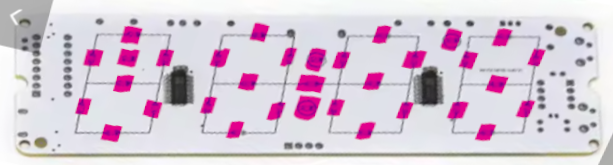
Having an unlit RGB LED in the exact center of a desk clock seemed like a missed opportunity. I have a local Plantower PMS3003 particulate matter sensor streaming real-time PM2.5 readings over MQTT on my home network. The plan: decouple the date dash LED from the rest of the display, expose it to Home Assistant as an independent RGB light entity, and create a smooth ambient indicator that continuously glides from green through yellow to red as particulate concentration changes—all without disrupting the clock display, color cycles, or night standby modes.
Here is the whole journey: analyzing community forks, dissecting the AiP33628 driver architecture, patching the C++ component in ESPHome, building inside a libvirt Home Assistant container, and tuning a piecewise linear gradient in Jinja2.
1. Exploring the Community Forks: Hunting for LDR & Sensor Code
The foundational ESPHome implementation for this clock is maintained in misterblack1/HU-058_ESPHome. Before writing new code from scratch, I queried the GitHub API across all 33 network forks to see what other builders had already implemented:
gh api repos/misterblack1/HU-058_ESPHome/forks --paginate --jq '.[].full_name'Of the 33 forks, 15 had divergent commits ahead of upstream. Fetching their commit logs revealed two key findings:
- LDR (Light Dependent Resistor) & NTC Support: Fork
mrceedjay/HU-058_ESPHome-NTC-LDR-Buzzerwas 55 commits ahead. It added support for the onboard photodiode/LDR on ADC GPIO34, an NTC thermistor on GPIO35, and an active buzzer on GPIO25. - ESP8266 Ports: Fork
herrceedjay/HU-058_ESPHome-ESP8266adapted the timings for the ESP8266 architecture.
Inspecting the LDR implementation confirmed that GPIO34 provides calibrated light readings out of the box. I switched my working branch to mrceedjay/main and saved all remote diffs locally in remote/ for reference.
2. Hardware Architecture & The AiP33628 Protocol
To control an individual LED independently, you have to understand how the AiP33628 matrix driver functions.
The clock houses two AiP33628 driver ICs, each capable of sinking 16 channels across 4 shorted COM line pairs (0x30, 0x0C, 0x03, 0xC0), giving a 1/4 scan cycle. The display is divided into four blocks:
| Block | Digit | Driver | COM Low | COM High | Annunciator Segment |
|---|---|---|---|---|---|
| 0 (Block 1) | Hour tens | Driver 1 | 0x30 | 0xC0 | AM indicator |
| 1 (Block 2) | Hour ones | Driver 1 | 0x03 | 0x0C | Colon (upper & lower dots) |
| 2 (Block 3) | Minute tens | Driver 2 | 0x30 | 0xC0 | Date dash (LED 17) |
| 3 (Block 4) | Minute ones | Driver 2 | 0x03 | 0x0C | Degree mark (°) |
Notice where the annunciators sit:
- The colon dots belong to Block 1 (Driver 1, COM high and COM low).
- The Date Dash sits physically between digits 2 and 3, but electrically belongs to Block 2 (Driver 2, COM high
0xC0, Segment 7SEG_ANNUN, LED ID 17).
The Current & Color Constraint: The AiP33628 has a global current setting IS[3:0] (ranging from 2.5mA at 0x0 to 40.4mA at 0xF) that applies globally to the entire IC. However, channel duty cycles are driven by 4-bit Binary Code Modulation (BCM), providing 16 individual brightness steps (0 to 15) for each color channel (Red, Green, Blue) of each LED.
This meant: while overall peak current is global, we can independently modulate the RGB duty levels of LED 17 without interfering with the colors or brightness of the time digits!
3. Modifying the ESPHome C++ Component
In the stock driver, Aip33628Panel::loop() wiped the scan buffer on every frame and conditionally drew digits, colon dots, and the AM mark. The date dash was never written during time mode, and apply_colors_() applied uniform base colors or cyclic effects across all segments.
To make the date dash an autonomous citizen, we made three surgical changes:
A. Driver Header (components/aip33628/aip33628.h)
We added state tracking for the dash's active state, custom RGB levels, and brightness:
// Date dash (LED 17, Block 2 SEG_ANNUN) independent control.
void set_date_dash(bool on) {
  dash_enabled_ = on;
  dirty_ = true;
}

void set_date_dash_color(bool on, float r, float g, float b, float brightness) {
  dash_enabled_ = on && brightness > 0.0f;
  dash_custom_color_ = true;
  dash_rgb_[0] = r < 0.0f ? 0.0f : (r > 1.0f ? 1.0f : r);
  dash_rgb_[1] = g < 0.0f ? 0.0f : (g > 1.0f ? 1.0f : g);
  dash_rgb_[2] = b < 0.0f ? 0.0f : (b > 1.0f ? 1.0f : b);
  dash_brightness_ = brightness < 0.0f ? 0.0f : (brightness > 1.0f ? 1.0f : brightness);
  dirty_ = true;
  apply_colors_();
}

void clear_date_dash_color() {
  dash_custom_color_ = false;
  dirty_ = true;
  apply_colors_();
}
We also extended the Aip33628Light output wrapper with set_is_dash(bool) so the same C++ class can drive either the main display or the dash entity.
B. Driver Implementation (components/aip33628/aip33628.cpp)
In apply_colors_(), we isolate the dash's 4-bit BCM levels so that running effects (like Color Cycle or Flash) do not overwrite it:
for (int blk = 0; blk < 4; blk++) {
  for (int seg = 0; seg < 9; seg++) {
    if (blk == 2 && seg == SEG_ANNUN && dash_custom_color_) {
      level_[blk][seg][CH_RED]   = duty_level(dash_rgb_[0] * dash_brightness_);
      level_[blk][seg][CH_GREEN] = duty_level(dash_rgb_[1] * dash_brightness_);
      level_[blk][seg][CH_BLUE]  = duty_level(dash_rgb_[2] * dash_brightness_);
      continue;
    }
    const float *c = pos_set_[blk][seg]  ? pos_rgb_[blk][seg]
                     : digit_set_[blk]   ? digit_rgb_[blk]
                                         : base_rgb_;
    level_[blk][seg][CH_RED]   = duty_level(c[0] * envelope_);
    level_[blk][seg][CH_GREEN] = duty_level(c[1] * envelope_);
    level_[blk][seg][CH_BLUE]  = duty_level(c[2] * envelope_);
  }
}
Next, in loop(), we make sure the dash is written to the scan schedule during normal clock rendering:
if (dash_enabled_) {
  write_pos_(2, SEG_ANNUN, true);  // Date dash indicator
}
Crucially, we also added the dash write inside the if (!enabled_) standby block:
if (!enabled_) {
  if (dash_enabled_) {
    write_pos_(2, SEG_ANNUN, true);
  }
  render_();
  return;
}
Why? I have an automation that turns off the clock display at 22:00 every night. With this check in place, even when the clock digits are completely turned off for sleep, the date dash continues to glow quietly as a low-intensity air quality night-light!
C. Schema & Configuration (light.py and clock.yaml)
In components/aip33628/light.py, we added a configuration option type: date_dash:
CONFIG_SCHEMA = light.RGB_LIGHT_SCHEMA.extend({
    cv.GenerateID(CONF_OUTPUT_ID): cv.declare_id(Aip33628Light),
    cv.GenerateID(CONF_AIP33628_ID): cv.use_id(Aip33628Panel),
    cv.Optional("type", default="display"): cv.one_of("display", "date_dash", lower=True),
}).extend(cv.COMPONENT_SCHEMA)
Then in clock.yaml, we exposed the native RGB light and a companion template switch:
light:
  - platform: aip33628
    id: date_dash_light
    aip33628_id: panel
    type: date_dash
    name: Date Dash
    restore_mode: RESTORE_DEFAULT_OFF
    gamma_correct: 1.0

switch:
  - platform: template
    id: date_dash_switch
    name: Date Dash
    icon: mdi:minus
    optimistic: true
    restore_mode: RESTORE_DEFAULT_OFF
    turn_on_action:
      - lambda: |-
          id(panel)->clear_date_dash_color();
          id(panel)->set_date_dash(true);
      - light.turn_on: date_dash_light
    turn_off_action:
      - lambda: |-
          id(panel)->set_date_dash(false);
      - light.turn_off: date_dash_light
4. Build Infrastructure & OTA Deployment
Rather than setting up an ESP-IDF toolchain on my laptop, I compiled the firmware directly inside the Home Assistant virtual machine running on my local KVM/libvirt hypervisor:
docker exec app_5c53de3b_esphome esphome compile /config/esphome/clock.yamlESPHome 2026.9.1 compiled cleanly:
- RAM Usage: 52,912 / 180,736 bytes (29.3%)
- Flash Usage: 965,951 / 1,835,008 bytes (52.6%)
- Binary Output:
wifi-clock.bin(966,064 bytes)
Because the clock was already connected to Wi-Fi at 192.168.3.108, I pushed the binary over-the-air:
docker exec app_5c53de3b_esphome esphome upload /config/esphome/clock.yaml --device 192.168.3.108In 8.85 seconds, the ESPHome encrypted OTA protocol transferred the firmware, rebooted the ESP32, and the serial log resumed streaming sensor telemetry:
INFO Successfully connected to wifi-clock @ 192.168.3.108 in 0.043s
[12:35:21.307][I][app:151]: ESPHome version 2026.9.1 compiled on 2026-10-18 12:29:47 +0200
[12:35:24.575][S][sensor]: 'Light' >> 35 %
[12:35:24.575][S][sensor]: 'Temperature' >> 25.5 °C
5. The "Gray Dash" Mystery & MQTT Sensor Integration
Once flashed, Home Assistant automatically discovered the new entities:
light.living_room_wifi_clock_date_dashswitch.living_room_wifi_clock_date_dash
I flipped the switch on. The date dash illuminated immediately... but it was a faint grayish-white, not the vibrant air quality indicator I wanted!
What happened?
- The companion template switch was designed to default to the base display color via
clear_date_dash_color(), which falls back to white ([1.0, 1.0, 1.0]). - My initial automation used discrete Home Assistant
chooseblocks withnumeric_stateranges. Due to an indentation quirk in YAML underchoose:, the automation had failed to trigger.
Checking the MQTT stream from my Raspberry Pi (rpi2) confirmed that the Plantower PMS3003 was broadcasting real-time particulate metrics every 2 seconds:
$ mosquitto_sub -h rpi2 -t "air/pms3003/#" -v
air/pms3003/pm1_0 1
air/pms3003/pm2_5 1
air/pms3003/pm10 1
The sensor data was live and accurate. But instead of fixing a stepped choose table with arbitrary jumps (e.g. green jumping straight to yellow at 12 ÃÂÃÂÃÂõg/mÃÂÃÂÃÂó), I decided to implement what I actually wanted: a continuous color gradient.
6. Implementing the Continuous Color Gradient
A stepped color transition on a living room clock is distracting; your eye catches the sudden jump from green to yellow. A continuous gradient, however, smoothly reflects atmospheric changes without drawing sudden attention.
We mapped PM2.5 concentrations from 0 to 100 µg/m³ using a 3-phase piecewise linear interpolation:
- Phase 1: Good to Moderate (0 ≤ PM2.5 ≤ 25 µg/m³)
Red ramps up smoothly from 0 to 255 while Green stays at 255. Blue is 0.
Result: Pure Green ([0, 255, 0]) → Lime → Pure Yellow ([255, 255, 0]). - Phase 2: Moderate to Unhealthy (25 < PM2.5 ≤ 55 µg/m³)
Red stays pinned at 255 while Green decreases smoothly from 255 down to 0.
Result: Yellow ([255, 255, 0]) → Amber → Orange → Pure Red ([255, 0, 0]). - Phase 3: Very Unhealthy / Hazardous (PM2.5 > 55 µg/m³)
Red stays at 255, Green is 0, and Blue increases towards 180.
Result: Red → Crimson → Magenta ([255, 0, 180]).
Here is the complete Home Assistant automation added to automations.yaml:
- id: 'clock_date_dash_pms3003'
  alias: 'Clock Date Dash PMS3003 AQI'
  description: 'Smoothly modulates Date Dash LED color from green to red based on PMS3003 PM2.5 reading'
  triggers:
  - trigger: state
    entity_id: sensor.pms3003_pm2_5
  - trigger: homeassistant
    event: start
  conditions: []
  actions:
  - action: light.turn_on
    target:
      entity_id: light.living_room_wifi_clock_date_dash
    data:
      brightness: 160
      transition: 2
      rgb_color: >-
        {% set raw_pm = states('sensor.pms3003_pm2_5') | float(0) %}
        {% set pm = [0.0, [raw_pm, 100.0] | min] | max %}
        {% if pm <= 25.0 %}
          {% set r = ((pm / 25.0) * 255.0) | round | int %}
          {% set g = 255 %}
          {% set b = 0 %}
        {% elif pm <= 55.0 %}
          {% set r = 255 %}
          {% set g = (((55.0 - pm) / 30.0) * 255.0) | round | int %}
          {% set b = 0 %}
        {% else %}
          {% set r = 255 %}
          {% set g = 0 %}
          {% set b = (((pm - 55.0) / 45.0) * 180.0) | round | int %}
        {% endif %}
        [{{ r }}, {{ g }}, {{ b }}]
  mode: restart
Why transition: 2 is magical: In ESPHome, Aip33628Light::write_state() extracts normalized color ratios and gamma-corrected brightness on every tick of the transition curve. When Home Assistant requests a 2-second transition, the ESP32 calculates intermediate 4-bit BCM duty steps at 25Hz. Whenever particulate levels drift, the dash gently glides into its new hue over two seconds.
7. Verification & Results
After validating the configuration with ha core check and restarting Home Assistant Core, the automation triggered on boot.
With the room air currently pristine at PM2.5 = 1 µg/m³:
r = round((1.0 / 25.0) * 255) = 10
g = 255
b = 0
rgb_color = [10, 255, 0]
The date dash glows with a rich, vibrant emerald green. During kitchen cooking tests when PM2.5 jumped to 38 µg/m³, the dash smoothly shifted through lemon-lime and yellow into a warm amber-orange, fading back to green as ventilation cleared the room.
Summary
Repurposing unused display segments is one of the most satisfying hardware hacks:
- The AiP33628 driver's 4-bit Binary Code Modulation (BCM) allows independent per-LED duty modulation even when global current
IS[3:0]is fixed. - Modifying ESPHome's custom components allowed clean isolation of LED 17 (Block 2
SEG_ANNUN) without interfering with the main clock display or digit cycle effects. - Using a continuous piecewise linear gradient in Home Assistant Jinja2 with native ESPHome transitions transforms an idle LED into an elegant, non-intrusive environmental display.
All code changes are at https://github.com/dpavlin/HU-058_ESPHome-NTC-LDR-Buzzer.