Results tagged “btrfs”

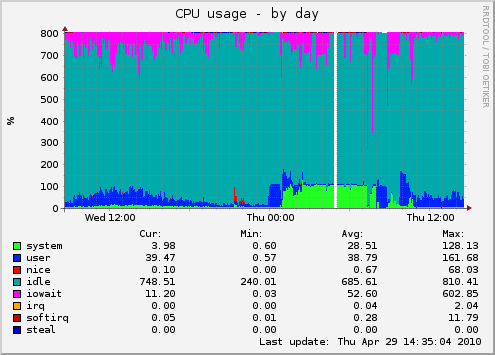
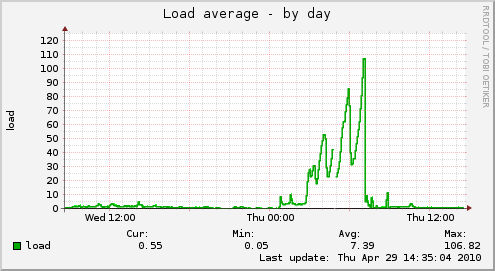
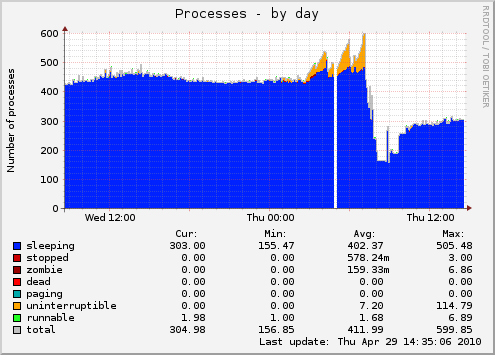
I love btrfs, and he hates me back. Tonight he decided to take away my holiday morning by spinning single core and bringing server down for three and half hours until I migrated everything back to ext4.

prod-load-day.png prod-processes-day.png prod-cpu-day.png

I will miss snapshots, but with all troubles I had so far, it's not worth it. See you in few years...

I have been following btrfs for quite some time. First I got kernel oopses with full disk (which have been fixed since), and then I began testing snapshots for incremental backup. Few weeks ago, I have taken a plunge and migrated by production server over to btrfs. I will try to summary first few weeks of my experience with it.

For a start, forget about using btrfs-tools which come with your distribution (Debian in my case). It's probably too old to include delete snapshot option which is really needed if you don't want to fill up your disk eventually. So, hop over to btrfs-progs-unstable and compile your own utilities.

With latest utilities at hand, I decided to make logical volume for each of my virtual machines. Before installing (or migrating) machine, create sub-volume. This is important because snapshot work on file-system or sub-volume level, and if you want to create incremental snapshots, you need to have sub-volume to snapshot.

root@prod:~# lvcreate -L 50G -n koha raid5
  Logical volume "koha" created

root@prod:~# mkfs.btrfs /dev/raid5/koha

WARNING! - Btrfs v0.19-15-g8f55b76-dirty IS EXPERIMENTAL
WARNING! - see http://btrfs.wiki.kernel.org before using

fs created label (null) on /dev/raid5/koha
        nodesize 4096 leafsize 4096 sectorsize 4096 size 50.00GB
Btrfs v0.19-15-g8f55b76-dirty

root@prod:~# mkdir /mnt/koha

root@prod:~# mount /dev/raid5/koha /mnt/koha

root@prod:~# btrfsctl -S rootfs /mnt/koha
operation complete
Btrfs v0.19-15-g8f55b76-dirty

Now, you are ready to install your machine in /mnt/koha/rootfs. After you have done that, you can create backup snapshots using something like this:

root@prod:~# mkdir /mnt/koha/.snap

root@prod:~# btrfsctl -s /mnt/koha/.snap/2010-04-19 /mnt/koha/rootfs/
operation complete
Btrfs v0.19-15-g8f55b76-dirty

Even, better, you can hop over to my sysadmin cookbook and fetch mksnap shell script which will create hourly snapshots of your machine for nice incremental backups. This is all nice and well, but after a while you will see that your disk-space increases all the time (which is expected because you are creating one snapshot every hour, collecting all changes).
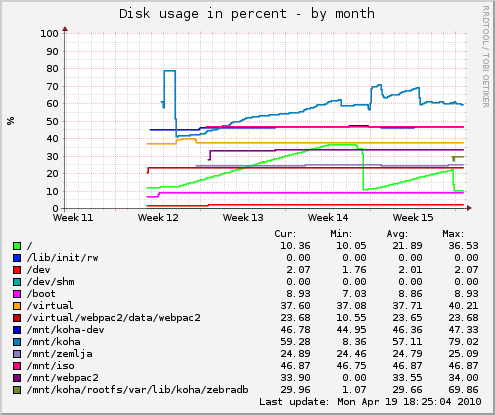
prod-df-month.png

As you can see in graph above, after two weeks of such usage, I figured out what I will run out of disk space eventually, and even worse, disk fragmentation begin to take toll on performance of my server. So, I implemented small perl script to expire snapshots older than 3 days (but keep single midnight snapshot for each day). I also decided to create cron job to defragment file-system every morning.

dpavlin@prod:~$ cat /etc/cron.d/btrfs-defrag

PATH=/usr/local/sbin:/usr/local/bin:/sbin:/bin:/usr/sbin:/usr/bin

# m h   dom mon dow     user    command
15 7    * * *           root    btrfsctl -d /mnt/koha/rootfs/

This did help a bit, but not good enough. I have three basic services on this box: Apache web server running perl cgi scripts, MySQL database and Zebra indexer. So, in a final step of despair (before going back to ext4) I decided to move Zebra to RAID1 volume which is on two separate disks. And it did make a huge change.
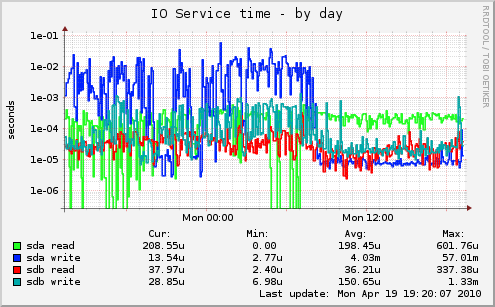
prod-iostat_ios-day.png

So, is btrfs ready for usage in production? That depends on your IO load. If you have to more-or-less random IO workloads (like RDBMS and full-text indexer in my example) spreading it over multiple disks will provide better performance than any choice of file-system. But, if snapshots are something useful for your use-case, give btrfs a try. Also have in mind that recovery tools for btrfs are... non-existent. So make backups (which is good idea anyway) and remember that btrfs snapshots on same disks don't count as backup.
You have heard of Apple Time Capsule, and zfs's snapshots which provide nice way to produce incremental backups which you can use to quickly recover a rm -Rf typo or compare changes... You can't really use LVM snapshots for that because they have fixed size of snapshot. ZFS has copy-on-write snapshots, but zfs-fuse isn't fastest solution on Linux.

I decided to give btrfs another try. On Debian 2.6.32-trunk kernels, it stills have problems with 686 kernel, but amd64 version (even with 32-bit users-pace) seems to work stable so far.

Let's take a look at example usage on /dev/vg/koha-btrfs logical volume.

  1. create filesystem
    root@mlin:~# mkfs.btrfs /dev/vg/koha-btrfs
    
  2. create subvolume which we will use for data
    root@mlin:~# btrfsctl -S koha-2010-01-25 /virtual.btrfs/
    
  3. populate it with some data
    root@mlin:~# time cp -ra /virtual.clone/koha-2010-01-25 /virtual.btrfs/
    
    real    15m32.507s
    user    0m1.288s
    sys     0m54.519s
    
  4. create base snapshot
    root@mlin:~# btrfsctl -s /virtual.btrfs/koha-2010-01-25.mlin /virtual.btrfs/koha-2010-01-25
    
    There is convention here: since snapshot directories have to be on same btrfs volume, I decided to use base_name(dot)something as convention for my snapshots.
  5. make some changes on base directory
    root@mlin:~# time rsync -ravH --numeric-ids --sparse --delete --exclude 'backup*' 10.60.0.90:/opl/clone/koha-2010-01-25/ /virtual.btrfs/koha-2010-01-25/
    
    sent 1538957 bytes  received 381670534 bytes  964049.03 bytes/sec
    total size is 18912566086  speedup is 49.35
    
    real    6m37.539s
    user    0m59.524s
    sys     1m23.633s
    
  6. make another snapshot for this version
    root@mlin:~# btrfsctl -s /virtual.btrfs/koha-2010-01-25.opr /virtual.btrfs/koha-2010-01-25
    
Following this, we now have three directories which share same data (tanks to copy-on-write feature in btrfs) and look like ordinary directories:
dpavlin@mlin:~$ ls -ald /virtual.btrfs/koha-2010-01-25*
drwxr-xr-x 1 root root 256 Dec 29 19:38 /virtual.btrfs/koha-2010-01-25
drwxr-xr-x 1 root root 256 Dec 29 19:38 /virtual.btrfs/koha-2010-01-25.mlin
drwxr-xr-x 1 root root 256 Dec 29 19:38 /virtual.btrfs/koha-2010-01-25.opr
After a while, you will run out of disk space, but since we are on LVM, extending filesystem is really easy:
dpavlin@mlin:~$ mount -t btrfs
/dev/mapper/vg-koha--btrfs on /virtual.btrfs type btrfs (rw,noatime)


root@mlin:~# lvdisplay /dev/vg/koha-btrfs 
  --- Logical volume ---
  LV Name                /dev/vg/koha-btrfs
  VG Name                vg
  LV UUID                kl4QUc-IyK2-IM8m-0DKD-eI5k-H2T1-HySIwE
  LV Write Access        read/write
  LV Status              available
  # open                 1
  LV Size                40.00 GB
  Current LE             10240
  Segments               1
  Allocation             inherit
  Read ahead sectors     auto
  - currently set to     256
  Block device           253:1

   
root@mlin:~# lvextend -L +10G /dev/vg/koha-btrfs
  Extending logical volume koha-btrfs to 50.00 GB
  Logical volume koha-btrfs successfully resized


root@mlin:~# btrfsctl -r max /virtual.btrfs/

Hopefully this will help you to get started with btrfs snapshots. I still don't consider it super stable (especially since i did saw few kernel oopses using 2.6.32-trunk-686) but for quick experiments with Linux containers (or anything stored on filesystem for that matter) it proved more than adequate.

As you might guessed by now, I played with file-systems for backup appliance So, against my good judgment, I decided to try btrfs to see how ready is it to replace zfs-fuse configuration with real in-kernel file-system (zfs-fuse is not slow, because disks are much slower than any peace of software).

So far, I found following annoyances in brtrs:

  1. snapshots can't be removed (I'm doing incremental forever backups, so this is not show-stopper)
    You can remove all files in snapshot directory, but not directory itself. I would guess that removing files would just increase disk space, because it's copy-on-write filesystem, but I didn't test that.
  2. there is no indication which directory is snapshot (if you didn't wrote down in log which is snapshot, you are out of luck)
  3. it seeks quite a lot (there is 40-70% wait time in vmstat while running rsync which I guess is seek, because there is no block input/output operations at same time)
  4. it will oops your (Debian 2.6.29-2-686) kernel:
    Message from syslogd@klin at May 16 00:42:31 ...
     kernel:[ 4057.994566]  [<c0119e0f>] kmap_atomic_prot+0xbd/0xdd
    Message from syslogd@klin at May 16 00:42:31 ...
     kernel:[ 4057.994576]  [<c0119d30>] kunmap_atomic+0x58/0x7a
    Message from syslogd@klin at May 16 00:42:31 ...
     kernel:[ 4057.994586]  [<f83a61a2>] btrfs_cow_block+0x134/0x13d [btrfs]
    Message from syslogd@klin at May 16 00:42:31 ...
     kernel:[ 4057.994608]  [<f83a8b4b>] btrfs_search_slot+0x1f0/0x622 [btrfs]
    Messag./pull-snapshot-backup.sh: line 8:  4316 Segmentation fault      rsync -ravHC --numeric-ids --delete $from:/mnt/vz-backup/private/$1/ /$pool/$1/
    
    dmesg-btrfs-bug.txt

After that I concluded that warning about alpha state of btrfs is there with a reason. I didn't fully appreciate Theodore Ts's warning about development status of btrfs until I got kernel oops.